メインコンテンツにスキップ
リペアコミュニティに参加 - アカウントの作成

Canon PowerShot S50 LCD Screen Replacement

必要な工具と部品

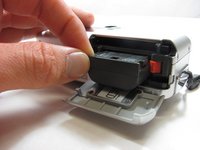
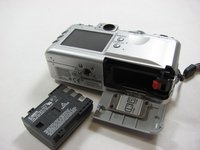
  1. Canon PowerShot S50 LCD Screen Replacement, Battery: 手順 1、 2の画像 1 Canon PowerShot S50 LCD Screen Replacement, Battery: 手順 1、 2の画像 2
    • Place camera LCD side up and press up on the battery door.

    • Let it swing open until you can see the battery inside.

    FixBotに聞いてみる

    コメントを追加

  2. Canon PowerShot S50 LCD Screen Replacement: 手順 2、 1の画像 1
    • Press down on the orange plastic.

    • This will gently eject the battery from its compartment.

    FixBotに聞いてみる

    コメントを追加

  3. Canon PowerShot S50 LCD Screen Replacement: 手順 3、 2の画像 1 Canon PowerShot S50 LCD Screen Replacement: 手順 3、 2の画像 2
    • Holding the edges, slide out the battery.

    FixBotに聞いてみる

    コメントを追加

  4. Canon PowerShot S50 LCD Screen Replacement, Front Panel/Battery Door: 手順 4、 1の画像 1
    • Look at the camera from the side with the lanyard and 4 screws.

    • Remove the two 3.4 mm screws on the metallic colored part.

    FixBotに聞いてみる

    コメントを追加

  5. Canon PowerShot S50 LCD Screen Replacement: 手順 5、 1の画像 1
    • Remove the 3mm screw on the top left.

    • NOTE: When reassembling, it is helpful to put the top screw back in before placing the front cover back on the camera.

    • Now remove the 5.3mm screw on the bottom.

    FixBotに聞いてみる

    コメントを追加

  6. Canon PowerShot S50 LCD Screen Replacement: 手順 6、 1の画像 1
    • Place the camera LCD side down.

    • Remove the two 5.3mm screws by the battery door.

    FixBotに聞いてみる

    コメントを追加

  7. Canon PowerShot S50 LCD Screen Replacement: 手順 7、 1の画像 1
    • Remove the four 3.4mm screws on the bottom of the camera around the tripod mount.

    • Make sure to keep these screws separate from the previous 5.3 mm screws.

    FixBotに聞いてみる

    コメントを追加

  8. Canon PowerShot S50 LCD Screen Replacement: 手順 8、 1の画像 1
    • Stand the camera back up.

    • Remove the two 3.6mm screws on the side with the A/V Out port.

    FixBotに聞いてみる

    コメントを追加

  9. Canon PowerShot S50 LCD Screen Replacement: 手順 9、 1の画像 1
    • Lift open the rubber flap covering the A/V Out port.

    • Remove the 3.4mm screw in the center.

    • During reassembly, put the A/V out rubber door on before replacing the front panel of the camera

    FixBotに聞いてみる

    コメントを追加

  10. Canon PowerShot S50 LCD Screen Replacement: 手順 10、 1の画像 1
    • Use a spudger and gently open up the front panel of the camera.

    • A thin plastic ribbon will stay connected by a brown piece to front panel of the camera.

    FixBotに聞いてみる

    コメントを追加

  11. Canon PowerShot S50 LCD Screen Replacement: 手順 11、 1の画像 1
    • There will be a brown plastic piece keeping the thin plastic ribbon in place.

    • Use the spudger to pull out the brown plastic piece attached to the orange plastic.

    FixBotに聞いてみる

    コメントを追加

  12. Canon PowerShot S50 LCD Screen Replacement: 手順 12、 1の画像 1
    この手順で使用する道具:
    Tweezers
    $4.99
    • Use a pair of tweezers and remove the metal piece inside the camera.

    FixBotに聞いてみる

    コメントを追加

  13. Canon PowerShot S50 LCD Screen Replacement: 手順 13、 1の画像 1
    • Remove the battery door

    • NOTE: Putting this back on requires aligning the spring on the back of the door with the hole on the camera

    FixBotに聞いてみる

    コメントを追加

  14. Canon PowerShot S50 LCD Screen Replacement, Right Motherboard: 手順 14、 1の画像 1
    • Disconnect the two plastic ribbons on the lower half of the right motherboard.

    • NOTE: You will have to lift up the brown plastic piece in order to pull out the second ribbon wire.

    FixBotに聞いてみる

    コメントを追加

  15. Canon PowerShot S50 LCD Screen Replacement: 手順 15、 1の画像 1
    • Remove the two 3.4mm screws on the right motherboard.

    FixBotに聞いてみる

    コメントを追加

  16. Canon PowerShot S50 LCD Screen Replacement: 手順 16、 1の画像 1
    • Disconnect the two wired plugs below the flash.

    FixBotに聞いてみる

    コメントを追加

  17. Canon PowerShot S50 LCD Screen Replacement: 手順 17、 1の画像 1
    • Disconnect the wired plug at the bottom of the right motherboard.

    FixBotに聞いてみる

    コメントを追加

  18. Canon PowerShot S50 LCD Screen Replacement: 手順 18、 1の画像 1
    この手順で使用する道具:
    Tweezers
    $4.99
    • Use a pair of tweezers to pull the right motherboard away from the main body of the camera.

    FixBotに聞いてみる

    コメントを追加

  19. Canon PowerShot S50 LCD Screen Replacement, Outer Casing: 手順 19、 1の画像 1
    • Using a spudger, gently separate the back panel from the rest of the camera and remove it.

    FixBotに聞いてみる

    コメントを追加

  20. Canon PowerShot S50 LCD Screen Replacement, LCD Screen: 手順 20、 1の画像 1
    • Remove the 2.6mm screw on the bottom of the camera located directly under the LCD screen.

    • This screw should be holding two pieces of orange film down.

    • When replacing this screw, make sure that the orange film is secure below it before screwing it in.

    FixBotに聞いてみる

    コメントを追加

  21. Canon PowerShot S50 LCD Screen Replacement: 手順 21、 1の画像 1
    • Disconnect the film from the bottom of the camera under the LCD Screen.

    FixBotに聞いてみる

    コメントを追加

  22. Canon PowerShot S50 LCD Screen Replacement: 手順 22、 1の画像 1
    • Remove the 3.3mm screw on the bottom left of the LCD screen.

    FixBotに聞いてみる

    コメントを追加

  23. Canon PowerShot S50 LCD Screen Replacement: 手順 23、 1の画像 1
    • Remove the 2.4mm screw located just to the upper right of the LCD Screen.

    FixBotに聞いてみる

    コメントを追加

  24. Canon PowerShot S50 LCD Screen Replacement: 手順 24、 1の画像 1
    • Gently remove the LCD Screen.

    FixBotに聞いてみる

    コメントを追加

終わりに

To reassemble your device, follow these instructions in reverse order.

キャンセル: このガイドを終了できませんでした。

ある他の人がこのガイドを完成しました。

作成者

7人の作成者と共同で作成されました。

Jacob

メンバー登録日: 03/29/12

16 ポイント

3のガイドは作成済み

チーム

Cal Poly, Team 7-34, Maness Spring 2012 Cal Poly, Team 7-34, Maness Spring 2012人のメンバー

CPSU-MANESS-S12S7G34

5 メンバー

6のガイドは作成済み

0件のガイドコメント

コメントを追加

統計データ:

過去 24時間: 2

過去 7 日: 25

過去 30 日: 65

今までの合計 2,039