メインコンテンツにスキップ
リペアコミュニティに参加 - アカウントの作成

Cambridge SoundWorks OontZ Angle Plus Motherboard Replacement

必要な工具と部品

  1. Cambridge SoundWorks OontZ Angle Plus Motherboard  Replacement, Lower Casing: 手順 1、 2の画像 1 Cambridge SoundWorks OontZ Angle Plus Motherboard  Replacement, Lower Casing: 手順 1、 2の画像 2
    • Pull back the six screw covers on the bottom of the device.

    • Starting from the screw covers, peel the casing away from the bottom plate.

    FixBotに聞いてみる
  2. Cambridge SoundWorks OontZ Angle Plus Motherboard  Replacement, Battery: 手順 2、 1の画像 1
    • Unscrew the five 11.5mm Phillips screws on the bottom plate.

    FixBotに聞いてみる
  3. Cambridge SoundWorks OontZ Angle Plus Motherboard  Replacement: 手順 3、 1の画像 1
    • Carefully pull apart the bottom plate and the top plate, using the blue plastic opening tool.

    FixBotに聞いてみる
  4. Cambridge SoundWorks OontZ Angle Plus Motherboard  Replacement: 手順 4、 1の画像 1
    • Once the bottom plate and the top plate are separated, slowly pull the back plate away from the top plate.

    • There are wires connected to both plates so do this step with care.

    FixBotに聞いてみる
  5. Cambridge SoundWorks OontZ Angle Plus Motherboard  Replacement: 手順 5、 1の画像 1
    • Unscrew the two 10 mm Phillips screws on the brace holding down the battery.

    • Remove the brace that holds the battery in place.

    FixBotに聞いてみる
  6. Cambridge SoundWorks OontZ Angle Plus Motherboard  Replacement: 手順 6、 1の画像 1
    • Separate the battery from the bottom plate and set the bottom plate aside.

    FixBotに聞いてみる
  7. Cambridge SoundWorks OontZ Angle Plus Motherboard  Replacement: 手順 7、 1の画像 1
    • With some force, push the motherboard straight in toward the center of the device.

    FixBotに聞いてみる
  8. Cambridge SoundWorks OontZ Angle Plus Motherboard  Replacement: 手順 8、 1の画像 1
    • Pull the motherboard straight out of the device.

    • There is some adhesive on the motherboard that holds it in place. This make the motherboard fit in the groove rather tight.

    FixBotに聞いてみる
  9. Cambridge SoundWorks OontZ Angle Plus Motherboard  Replacement: 手順 9、 1の画像 1
    • Desolder the wires that connect the battery to the motherboard, negative (black wire) and positive (red wire).

    FixBotに聞いてみる
  10. Cambridge SoundWorks OontZ Angle Plus Motherboard  Replacement, Motherboard: 手順 10、 1の画像 1
    • Unplug the wires that connect the speakers to the motherboard.

    FixBotに聞いてみる
  11. Cambridge SoundWorks OontZ Angle Plus Motherboard  Replacement: 手順 11、 1の画像 1
    • Unplug the thin white cable connected to the buttons.

    FixBotに聞いてみる
  12. Cambridge SoundWorks OontZ Angle Plus Motherboard  Replacement: 手順 12、 2の画像 1 Cambridge SoundWorks OontZ Angle Plus Motherboard  Replacement: 手順 12、 2の画像 2
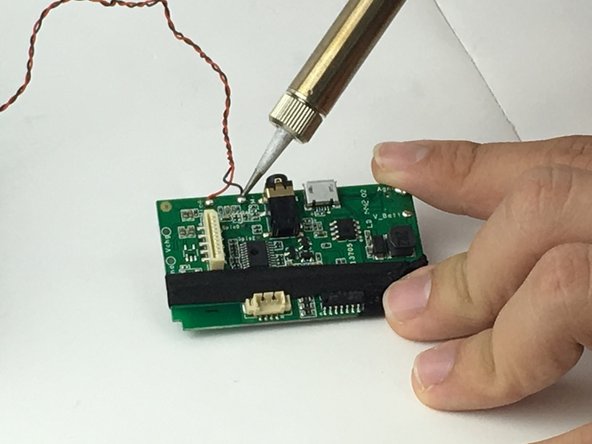
    • Desolder the wires that connect the LED to the motherboard.

    FixBotに聞いてみる
終わりに

To reassemble your device, follow these instructions in reverse order.

作成者

4人の作成者と共同で作成されました。

Farshad Mohebban

メンバー登録日: 02/10/16

524 ポイント

4のガイドは作成済み

チーム

USF Tampa, Team 1-1, Nance Spring 2016 USF Tampa, Team 1-1, Nance Spring 2016人のメンバー

USFT-NANCE-S16S1G1

4 メンバー

6のガイドは作成済み

0件のガイドコメント

コメントを追加

統計データ:

過去 24時間: 0

過去 7 日: 2

過去 30 日: 18

今までの合計 2,062