メインコンテンツにスキップ
リペアコミュニティに参加 - アカウントの作成

Battery Replacement

必要な工具と部品

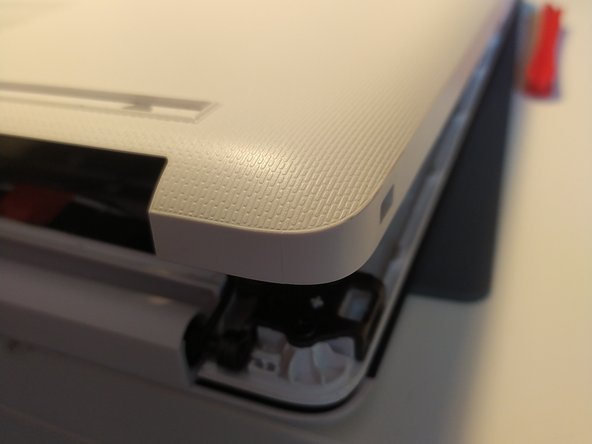
  1. Battery Replacement, removal of bottom case: 手順 1、 2の画像 1 Battery Replacement, removal of bottom case: 手順 1、 2の画像 2
    • remove the feet with a spudger

    FixBotに聞いてみる
  2. Battery Replacement: 手順 2、 2の画像 1 Battery Replacement: 手順 2、 2の画像 2
    • Remove the 11 screw with a PH0 screwdriver.

    • The screws are identical

    FixBotに聞いてみる
  3. Battery Replacement: 手順 3、 2の画像 1 Battery Replacement: 手順 3、 2の画像 2
    • Insert a spudger between the bottom cover and the keyboard module, then go around the whole cover to uncip everything.

    • Remove the bottom cover from the computer.

    FixBotに聞いてみる
  4. Battery Replacement: 手順 4、 1の画像 1
    • You now have acces to the inside of the machine.

    FixBotに聞いてみる
  5. Battery Replacement, Battery: 手順 5、 1の画像 1
    • Remove the 3 screws that keep the battery in place, using a Phillips screwdriver.

    FixBotに聞いてみる
  6. Battery Replacement: 手順 6、 1の画像 1
    • Disconnect the battery by gently lifting it.

    • Don't lift the battery too forcefully! It is held together by notches on the opposite side of the connector.

    • Pull the battery toward the top of the computer to dislodge it.

    FixBotに聞いてみる
終わりに

To put your device back together, follow the instructions in reverse order.

以下の翻訳者の皆さんにお礼を申し上げます:

fr en

100%

これらの翻訳者の方々は世界を修理する私たちのサポートをしてくれています。 あなたも貢献してみませんか?
翻訳を始める ›

作成者

1人の作成者と共同作成されました。

Léo FRAYSSE

メンバー登録日: 09/03/18

1,426 ポイント

6のガイドは作成済み

0件のガイドコメント

コメントを追加

統計データ:

過去 24時間: 1

過去 7 日: 8

過去 30 日: 37

今までの合計 456