はじめに
Common issues that involve the charging base battery is when it cannot hold a charge while unplugged. It is important to know the difference between replacing the charging base's battery and speaker's battery. The charging base battery should be replaced for the reason listed above while the speaker's battery should only be replaced if the speaker will not power on, even when plugged into the Micro USB charger and to an AC adapter that is plugged into the wall.
必要な工具と部品
-
-
-
Use the metal spudger to peel back the rubber from the bottom of the auxiliary charging base to reveal the screw.
 FixBotに聞いてみる
-
-
-
Use the screwdriver with the J0 bit attatched to detach all four 10 mm screws from the charging base.
-
-
-
-
Pull the top cover off of the charging base to reveal the internal chip.
-
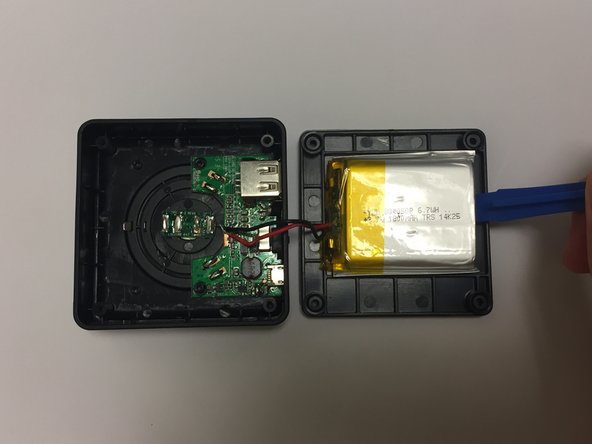
Use the plastic opening tool to pry the battery from the top cover.
-
-
この手順で使用する道具:Tweezers$4.99
-
Use the tweezers to carefully detach the wires from the internal chip.
-
-




To reassemble your device, follow these instructions in reverse order.

チーム

Baylor, Team S1-G1, Johnson Spring 2018 Baylor, Team S1-G1, Johnson Spring 2018人のメンバー
BU-JOHNSON-S18S1G1
3 メンバー
10のガイドは作成済み
