はじめに
This guide will teach you how to replace the board that controls the inputs of the physical buttons on the device. If you suspect your buttons are not physically broken (i.e. they feel fine and click normally), but they still do not function, it may help to replace the button module board. You will want to take care to not break the fragile plastic clips when removing the device's plastic backing, and you should be careful not to discharge any static electricity into the sensitive boards on the device.
必要な工具と部品
-
-
Detach the keyboard from the screen by depressing the silver button on the hinge and pulling upwards on the tablet.
 FixBotに聞いてみる
-
-
-
Insert the spudger behind the plastic backing of the tablet and then slide the spudger around the outside of the tablet, carefully releasing all internal clips.
-
-
-
この手順で使用する道具:Tweezers$3.99
-
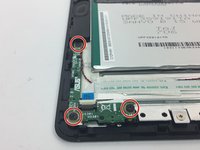
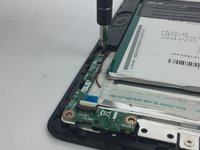
Flip up the clip holding the white ribbon cable in with the angled tweezers.
-
Gently pull the white ribbon cable away from the button module.
-




To reassemble your device, follow these instructions in reverse order.

チーム

USF Tampa, Team 4-3, Passmore Fall 2016 USF Tampa, Team 4-3, Passmore Fall 2016人のメンバー
USFT-PASSMORE-F16S4G3
4 メンバー
10のガイドは作成済み
