はじめに
The battery is located on the bottom of the laptop. Before starting the guide, make sure the laptop's charger is not plugged in. No tools are needed for this guide.
-
-
-
Start by placing the laptop upside-down on a flat surface.
-
Find the two clips on the back portion of the laptop.
 FixBotに聞いてみる
-
-
-
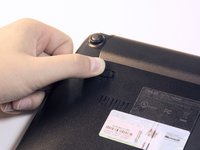
Using your finger, push the clip labeled with a "1" on the laptop from the lock position to unlock position.
-
-
-
-
Using your finger, push and hold the pin indicated by a "2" on the laptop from the lock to unlock position.
-
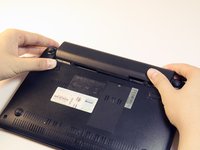
While holding this pin in the unlock position, use your other hand to pull the battery horizontally away from the laptop.
-
-



To reassemble your device, follow these instructions in reverse order.
2 の人々がこのガイドを完成させました。

チーム

Cal Poly, Team 13-32, Maness Spring 2014 Cal Poly, Team 13-32, Maness Spring 2014人のメンバー
CPSU-MANESS-S14S13G32
5 メンバー
25のガイドは作成済み
