メインコンテンツにスキップ
リペアコミュニティに参加 - アカウントの作成

Apple PowerBook 520 Memory (RAM) Replacement

必要な工具と部品

  1. Apple PowerBook 520 Memory (RAM) Replacement, Case: 手順 1、 2の画像 1 Apple PowerBook 520 Memory (RAM) Replacement, Case: 手順 1、 2の画像 2
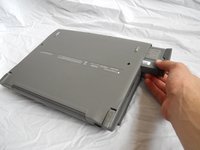
    • Turn computer over.

    • Remove battery expansion cover and battery.

    FixBotに聞いてみる

    コメントを追加

  2. Apple PowerBook 520 Memory (RAM) Replacement: 手順 2、 1の画像 1
    • With monitor hinge at the bottom, remove the two top center screws.

    FixBotに聞いてみる

    コメントを追加

  3. Apple PowerBook 520 Memory (RAM) Replacement: 手順 3、 1の画像 1
    • Remove top left and top right screws.

    FixBotに聞いてみる

    コメントを追加

  4. Apple PowerBook 520 Memory (RAM) Replacement: 手順 4、 1の画像 1
    • Remove middle left and middle right screws.

    FixBotに聞いてみる

    コメントを追加

  5. Apple PowerBook 520 Memory (RAM) Replacement: 手順 5、 1の画像 1
    • Open computer kickstands.

    • Remove screws underneath each kickstand.

    FixBotに聞いてみる

    コメントを追加

  6. Apple PowerBook 520 Memory (RAM) Replacement: 手順 6、 1の画像 1
    • Lift keyboard from bottom and take out of shell.

    FixBotに聞いてみる

    コメントを追加

  7. Apple PowerBook 520 Memory (RAM) Replacement: 手順 7、 3の画像 1 Apple PowerBook 520 Memory (RAM) Replacement: 手順 7、 3の画像 2 Apple PowerBook 520 Memory (RAM) Replacement: 手順 7、 3の画像 3
    • Lift the white ribbon clamps securing the keyboard ribbon cables to the motherboard. You can do this using a plastic opening tool.

    • Removing both ribbon cables from the motherboard will leave the clamps like so.

    • From here you can access the logic board, hard drive, and floppy drive.

    FixBotに聞いてみる

    コメントを追加

  8. Apple PowerBook 520 Memory (RAM) Replacement, Memory (RAM): 手順 8、 1の画像 1
    • Open the panel on back of the device. Remove 2 T8 torque screws.

    FixBotに聞いてみる

    コメントを追加

  9. Apple PowerBook 520 Memory (RAM) Replacement: 手順 9、 1の画像 1
    • Remove the plastic panel underneath the LCD Screen.

    FixBotに聞いてみる

    コメントを追加

  10. Apple PowerBook 520 Memory (RAM) Replacement: 手順 10、 1の画像 1
    • Remove the 2 T8 Torx Screws securing the logic board protection plate from the midsection of the logic board protection plate. Remove the T8 Torx Screw from the back of the plate, underneath the hinge.

    FixBotに聞いてみる

    コメントを追加

  11. Apple PowerBook 520 Memory (RAM) Replacement: 手順 11、 1の画像 1
    • Remove the logic board protection plate.

    FixBotに聞いてみる

    コメントを追加

  12. Apple PowerBook 520 Memory (RAM) Replacement: 手順 12、 1の画像 1
    • Using a plastic spudger, gently pry up the uppermost board fixture. This is the Memory (RAM).

    FixBotに聞いてみる

    コメントを追加

  13. Apple PowerBook 520 Memory (RAM) Replacement: 手順 13、 1の画像 1
    • Once the old Memory board is removed, replace it with the new Memory board.

    FixBotに聞いてみる

    コメントを追加

終わりに

To reassemble your device, follow these instructions in reverse order.

キャンセル: このガイドを終了できませんでした。

2 の人々がこのガイドを完成させました。

作成者

10人の作成者と共同で作成されました。

Tyler

メンバー登録日: 04/10/11

148 ポイント

2のガイドは作成済み

チーム

Cal Poly, Team 20-66, Walters Spring 2011 Cal Poly, Team 20-66, Walters Spring 2011人のメンバー

CPSU-WALTERS-S11S20G66

4 メンバー

3のガイドは作成済み

1件のガイドコメント

コメントを追加

統計データ:

過去 24時間: 0

過去 7 日: 12

過去 30 日: 46

今までの合計 4,005