メインコンテンツにスキップ
リペアコミュニティに参加 - アカウントの作成

Altec Lansing BoomJacket Power Button Replacement

必要な工具と部品

  1. Altec Lansing BoomJacket Power Button Replacement, Case Removal: 手順 1、 1の画像 1
    • Using your hands, remove the pegs (4+4) from the front and back of the speaker.

    FixBotに聞いてみる
  2. Altec Lansing BoomJacket Power Button Replacement: 手順 2、 1の画像 1
    • Remove the outer black rubber housing of the speaker.

    FixBotに聞いてみる
  3. Altec Lansing BoomJacket Power Button Replacement: 手順 3、 1の画像 1
    • Remove the inner blue rubber housing from the speaker.

    FixBotに聞いてみる
  4. Altec Lansing BoomJacket Power Button Replacement: 手順 4、 1の画像 1
    • Pull out the two black wire meshes using a metal spudger.

    • Be careful not to damage the metal casing.

    FixBotに聞いてみる
  5. Altec Lansing BoomJacket Power Button Replacement: 手順 5、 2の画像 1 Altec Lansing BoomJacket Power Button Replacement: 手順 5、 2の画像 2
    この手順で使用する道具:
    Tweezers
    $4.99
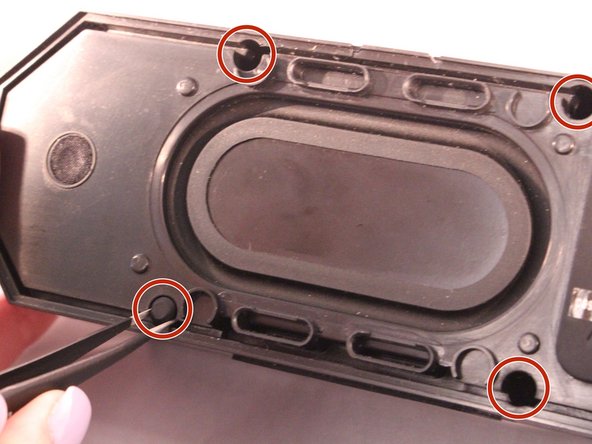
    • Using tweezers remove the rubber stoppers (4 at the back + 2 at the front).

    FixBotに聞いてみる
  6. Altec Lansing BoomJacket Power Button Replacement: 手順 6、 1の画像 1
    • Using the size PH1 screwdriver remove the screws exposed from the rubber stoppers (4 + 2).

    FixBotに聞いてみる
  7. Altec Lansing BoomJacket Power Button Replacement: 手順 7、 1の画像 1
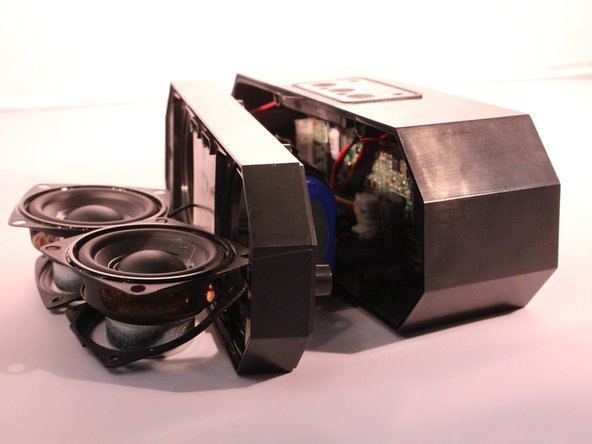
    • Pull the case apart and you will be able to see all the components inside the speaker.

    FixBotに聞いてみる
  8. Altec Lansing BoomJacket Power Button Replacement, Power Button: 手順 8、 1の画像 1
    • The battery will be sitting right behind the speakers when the case is open.

    FixBotに聞いてみる
  9. Altec Lansing BoomJacket Power Button Replacement: 手順 9、 2の画像 1 Altec Lansing BoomJacket Power Button Replacement: 手順 9、 2の画像 2
    • Unplug and disconnect the battery from the motherboard.

    FixBotに聞いてみる
  10. Altec Lansing BoomJacket Power Button Replacement: 手順 10、 1の画像 1
    • Using a size PH1 screwdriver, remove the two screws.

    FixBotに聞いてみる
  11. Altec Lansing BoomJacket Power Button Replacement: 手順 11、 2の画像 1 Altec Lansing BoomJacket Power Button Replacement: 手順 11、 2の画像 2
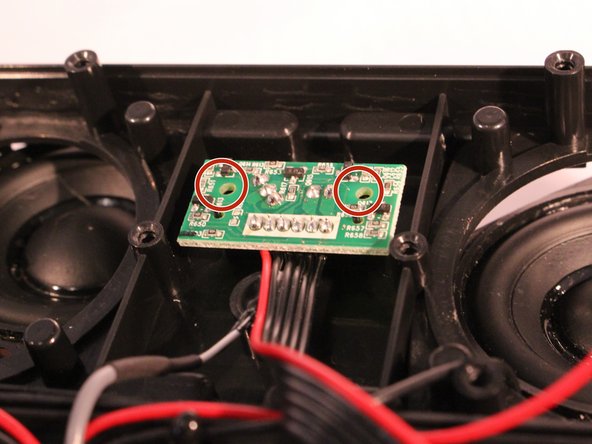
    • You will now see the motherboard for the power button.

    • Remove the 2 screws holding the motherboard into place.

    FixBotに聞いてみる
  12. Altec Lansing BoomJacket Power Button Replacement: 手順 12、 1の画像 1
    • Pick up the motherboard and take it out of the slot.

    FixBotに聞いてみる
  13. Altec Lansing BoomJacket Power Button Replacement: 手順 13、 1の画像 1
    • Disconnect the power button motherboard from the speaker motherboard.

    FixBotに聞いてみる
終わりに

To reassemble your device, follow these instructions in reverse order.

8 の人々がこのガイドを完成させました。

作成者

2人の作成者と共同で作成されました。

Ryan Byrnes

メンバー登録日: 04/12/17

872 ポイント

5のガイドは作成済み

チーム

1件のガイドコメント

Current speaker won’t turn on even though charging light looks all good so came across these instructions.

Thinking it’s the power button on my speaker that’s the issue.

Assuming these instructions are assuming you are replacing the power button motherboard? Where could I source one?

Cat Moure - 返信 共有

コメントを追加

統計データ:

過去 24時間: 0

過去 7 日: 5

過去 30 日: 62

今までの合計 21,290