メインコンテンツにスキップ
リペアコミュニティに参加 - アカウントの作成

Altec Lansing BoomJacket 2 Speaker Replacement

必要な工具と部品

    1. Altec Lansing BoomJacket 2 Speaker Replacement, Altec Lansing BoomJacket 2 Disassembly: 手順 1、 2の画像 1 Altec Lansing BoomJacket 2 Speaker Replacement, Altec Lansing BoomJacket 2 Disassembly: 手順 1、 2の画像 2
      • Starting from any side, use your fingers to grab the black rubber sleeve and gently pull away from the speaker on both sides.

      FixBotに聞いてみる

      コメントを追加

    2. Altec Lansing BoomJacket 2 Speaker Replacement: 手順 2、 2の画像 1 Altec Lansing BoomJacket 2 Speaker Replacement: 手順 2、 2の画像 2
      • Using your fingers, grab the blue sleeve from one side and pull away from the unit.

      FixBotに聞いてみる

      コメントを追加

    3. Altec Lansing BoomJacket 2 Speaker Replacement: 手順 3、 1の画像 1
      • At each of the marked pry spots, use the metal spudger to lift the speaker grill away from the case.

      • Avoid using excessive force to prevent bending the grill.

      FixBotに聞いてみる

      コメントを追加

    4. Altec Lansing BoomJacket 2 Speaker Replacement: 手順 4、 2の画像 1 Altec Lansing BoomJacket 2 Speaker Replacement: 手順 4、 2の画像 2
      この手順で使用する道具:
      Tweezers
      $4.99
      • Use the tweezers to remove the six rubber stoppers. There are four in the middle and two on the sides.

      FixBotに聞いてみる

      コメントを追加

    5. Altec Lansing BoomJacket 2 Speaker Replacement: 手順 5、 1の画像 1
      • Use the PH1 Phillips screwdriver to remove the six 12mm screws that lie underneath each rubber stopper.

      FixBotに聞いてみる

      コメントを追加

    6. Altec Lansing BoomJacket 2 Speaker Replacement: 手順 6、 1の画像 1
      • Gently pull apart the front panel from the base of the speaker.

      FixBotに聞いてみる

      コメントを追加

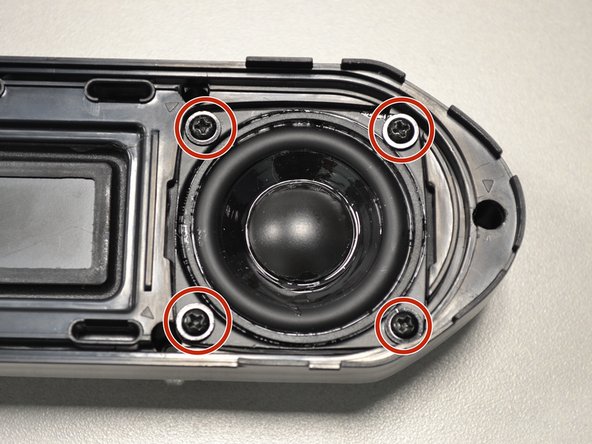
    1. Altec Lansing BoomJacket 2 Speaker Replacement, Speaker: 手順 7、 2の画像 1 Altec Lansing BoomJacket 2 Speaker Replacement, Speaker: 手順 7、 2の画像 2
      • Unscrew the four screws holding the speaker in place.

      FixBotに聞いてみる

      コメントを追加

    2. Altec Lansing BoomJacket 2 Speaker Replacement: 手順 8、 2の画像 1 Altec Lansing BoomJacket 2 Speaker Replacement: 手順 8、 2の画像 2
      • Unscrew the two screws on the smaller speaker.

      • Pull the small speaker through the larger speaker hole.

      FixBotに聞いてみる

      コメントを追加

終わりに

To reassemble your device, follow these instructions in reverse order.

キャンセル: このガイドを終了できませんでした。

2 の人々がこのガイドを完成させました。

作成者

2人の作成者と共同で作成されました。

Zach Braaten

メンバー登録日: 07/12/18

561 ポイント

4のガイドは作成済み

チーム

UW Tacoma, Team S1-G4, Cardinal Summer 2018 UW Tacoma, Team S1-G4, Cardinal Summer 2018人のメンバー

UWT-CARDINAL-SU18S1G4

4 メンバー

12のガイドは作成済み

0件のガイドコメント

コメントを追加

統計データ:

過去 24時間: 2

過去 7 日: 8

過去 30 日: 46

今までの合計 859