メインコンテンツにスキップ
リペアコミュニティに参加 - アカウントの作成

Alienware P18G M14X R1 Optical Drive Replacement

必要な工具と部品

  1. Alienware P18G M14X R1 Optical Drive Replacement, Back Cover: 手順 1、 1の画像 1
    • Loosen the top left and top right 6.5mm PH1 screws that hold down the back cover.

    • The screws will not be able to be removed from the back cover. They can only be loosened or tightened.

    FixBotに聞いてみる
  2. Alienware P18G M14X R1 Optical Drive Replacement: 手順 2、 1の画像 1
    • Slide back cover forward using your thumbs.

    FixBotに聞いてみる
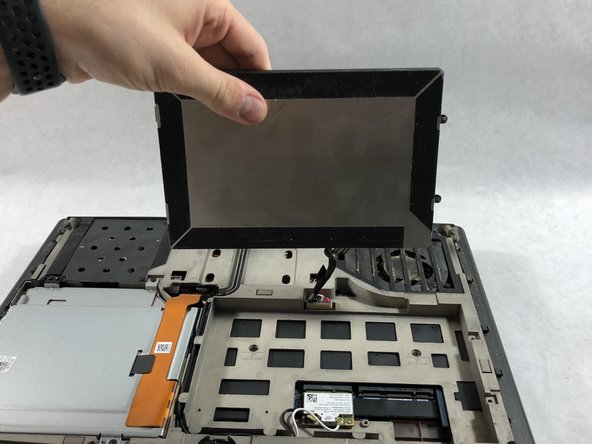
  3. Alienware P18G M14X R1 Optical Drive Replacement: 手順 3、 1の画像 1
    • Lift up the cover and set aside exposing the internals of the computer.

    FixBotに聞いてみる
  4. Alienware P18G M14X R1 Optical Drive Replacement, Battery: 手順 4、 1の画像 1
    • Make sure the laptop is turned off before starting.

    • Using PH1 screwdriver loosen the two screws on the right of the battery.

    • The screws will not be able to be removed from the battery. They can only be loosened or tightened.

    FixBotに聞いてみる
  5. Alienware P18G M14X R1 Optical Drive Replacement: 手順 5、 2の画像 1 Alienware P18G M14X R1 Optical Drive Replacement: 手順 5、 2の画像 2
    • Pull battery up using the tab provided.

    FixBotに聞いてみる
  6. Alienware P18G M14X R1 Optical Drive Replacement: 手順 6、 1の画像 1
    • Disconnect the clip connecting the battery to the computer.

    • Set battery aside.

    FixBotに聞いてみる
  7. Alienware P18G M14X R1 Optical Drive Replacement, Optical Drive: 手順 7、 1の画像 1
    • Unscrew the four 6.35mm screws using the PH1, that hold down the optical drive.

    FixBotに聞いてみる
  8. Alienware P18G M14X R1 Optical Drive Replacement: 手順 8、 1の画像 1
    • Using the plastic opening tool unclip the white connector holding down the orange cable.

    FixBotに聞いてみる
  9. Alienware P18G M14X R1 Optical Drive Replacement: 手順 9、 1の画像 1
    • Using the tab on the optical drive, lift the optical drive out of the computer and set it aside.

    FixBotに聞いてみる
終わりに

To reassemble your device, follow these instructions in reverse order.

作成者

1人の作成者と共同作成されました。

Andonaq Grozdani

メンバー登録日: 03/01/18

892 ポイント

5のガイドは作成済み

チーム

UMass Dartmouth, Team S2-G2, Simcock Spring 2018 UMass Dartmouth, Team S2-G2, Simcock Spring 2018人のメンバー

UMASSD-SIMCOCK-S18S2G2

3 メンバー

5のガイドは作成済み

0件のガイドコメント

コメントを追加

統計データ:

過去 24時間: 1

過去 7 日: 6

過去 30 日: 45

今までの合計 680