はじめに
This RAM replacement guide will prove to be very useful for devices that contain a faulty RAM. Often times the RAM slows performance of the device or stops it entirely. In order to optimize the computers performance a careful RAM replacement must be executed. However, it is important to follow the steps with care because the RAM ports are fragile and vital to the device. If the ports do become damaged the device will not likely work.
必要な工具と部品
-
-
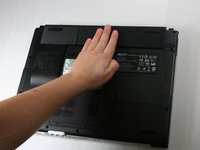
Begin with the device face down.
-
Orient the laptop so that the battery is on the side opposite of you and the headphone ports are facing towards you.
 FixBotに聞いてみる
-
-
-
Slide the button found below the battery to the left into the unlocked position.
-
-
-
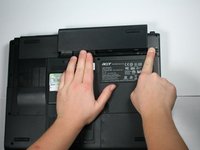
Locate the battery and the tab to the right of it.
-
Pull the tab to the right while simultaneously pushing the battery away from you.
-
-
-
Unscrew the two 4.6 mm Phillips #1 screws found at the bottom of the RAM cover using the phillips head j1 bit.
-
-
-
-
Open the RAM cover by wedging the opening tool and the metal spudger in the opening between the two screws.
-
-
-
Slide the opening tool around the sides of the cover to release the 3 tabs that hold the cover down.
-




To reassemble your device, follow these instructions in reverse order.
2 の人々がこのガイドを完成させました。

チーム

Baylor, Team 4-2, Williams Fall 2016 Baylor, Team 4-2, Williams Fall 2016人のメンバー
BU-WILLIAMS-F16S4G2
4 メンバー
7のガイドは作成済み
