フォーラムで人気の質問
質問する質問はありません。 最初の質問をしてみましょう!
背景
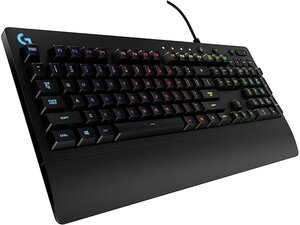
PRODIGY COMBOは、Logitechの有線ゲーミングキーボード「G213 Prodigy」とゲーミングヘッドセット「G231 Prodigy」を組み合わせた、手頃な価格のエントリー向けゲーミングセットです。キーボードは、LIGHTSYNC RGBバックライトキー、専用マルチメディアコントロール、カスタマイズ可能なキー機能、耐久性の高いプラスチック製の防滴トップケースを備えています。ヘッドセットは、通気性に優れたイヤーカップ素材と、調整可能な強化ヘッドバンドを採用した、長時間の使用を想定して設計されたProdigyファミリーの軽量有線ゲーミングヘッドセットです。両コンポーネントとも、信頼性と日常的なゲーム使用を目的として、耐久性のある素材と有線接続を採用しています。
モデルの識別方法
Logitech PRODIGY COMBOには、キーボード(モデル番号:M-U0049)、マウス(モデル番号:Y-U0029)、USBレシーバーが含まれています。モデルラベルの場所は以下の通りです。キーボード:底面の製品ラベル。マウス:底面の製品ラベル。USBレシーバー:レシーバーハウジングの平面または側面、USBプラグ付近に記載。各コンポーネントには、それぞれ独自のモデル番号(M/N)とシリアル番号(S/N)が記載されています。
特長
- コンポーネント: キーボード(Logitech G213 Prodigy)、ヘッドセット(Logitech G231 Prodigy)
- キーボードモデル番号: G213 Prodigy
- ヘッドセットモデル番号: G231 Prodigy
- スイッチタイプ: Logitech独自のMech-Domeメンブレンキー(メカニカルではなく、独自のメンブレン型ドームスイッチ)
- イルミネーション: LIGHTSYNC RGBバックライトキー
- 防滴性能: 防滴トップケース(キーボード)
- 接続: キーボード:有線USB(バスパワー駆動)、ヘッドセット:有線アナログ(3.5 mm有線接続)
- マルチメディアコントロール: キーボード上の専用マルチメディアキー
- 構造素材: 耐久性のあるABS/プラスチック製キーボードシャーシ、通気性に優れたイヤーカップ素材を使用した調整可能な強化ヘッドバンド
- 電源: キーボードはUSBバスパワー駆動、ヘッドセットはパッシブ型(バッテリーなし)
- 互換性: PCゲーミング用設計、標準的なオーディオ/USBポートでのプラグ&プレイ対応(ソフトウェアはLogitechサポートから任意で利用可能)
トラブルシューティング
修理に関連する一般的な故障には、液体をこぼした後のキーのベタつきや反応不良、RGB/バックライトの不具合、ヘッドセットの音声やマイクの切断などがあります。診断を開始するには、まずキーボードとヘッドセットを別のUSB/AUXポートや別のPCに接続してテストしてください。ケーブルやコネクタに断線やコネクタ用のピンの曲がりがないか確認し、液体による残留物や腐食がないか調べ、OS上でソフトウェア/ドライバーが認識されているかを確認します。ケーブルやプリント基板/PCBに物理的な損傷がある場合は、ハウジングを開けてはんだ付けされた接続部分やケーブルのストレインリリーフを点検し、必要に応じて損傷したケーブルやコネクタを交換または再はんだ付けしてください。
その他のトラブルシューティングについては、Logitechサポート(support.logi.com)へお問い合わせください。G213/G231 Prodigy製品の製品サポート、ドライバー、ダウンロード情報が提供されています。
その他の情報
保証情報
保証内容の詳細については、Logitechの地域別限定ハードウェア保証を参照してください。保証情報はLogitechのサポート/保証ページで確認できます。

