フォーラムで人気の質問
質問する質問はありません。 最初の質問をしてみましょう!
背景
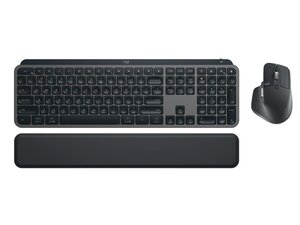
MX KEYS COMBO for Business Gen 2は、企業の生産性向上とマルチデバイスでのワークフローを目的として設計された、プロフェッショナル向けワイヤレスキーボードおよびアクセサリーのセットです。薄型のシザーキーボードに、スマートなバックライト機能と、Bluetooth Low EnergyまたはLogi Bolt USBレシーバーによるマルチホスト接続を備えています。耐久性の高い素材(強化プラスチックと内部の金属製コンポーネント)を使用し、日常的な長時間使用に耐えられるよう設計されており、耐水性の表面と安定した高級感のあるタイピングプラットフォームを提供します。主な特長には、長時間の動作が可能な充電式バッテリー、マルチデバイスペアリング、企業グレードのワイヤレスセキュリティなどがあります。
製品情報とモデルの識別方法
Logitech MX KEYS COMBO for BusinessGen2には、キーボード (M/N YR0073)、マウス (M/N MR0096)、USBレシーバー (M/N CU0021) が含まれています。モデルラベルの場所は以下の通りです。キーボード:底面の製品ラベル。マウス:底面の製品ラベル。USBレシーバー:レシーバーハウジングの平面、またはUSBプラグ付近の側面に印字。各コンポーネントには個別のモデル番号 (M/N) とシリアル番号 (S/N) が記載されています。
特長
- 付属コンポーネント: MX Keysビジネスキーボード (Gen 2) およびLogi Bolt USBレシーバー(同梱)。マウスのモデルはセットによって異なる場合があります。
- スイッチタイプ: 薄型シザースイッチ(Logitech独自のメンブレン+シザースタビライザー)
- キーキャップ素材: マット仕上げの成形ABS樹脂
- 接続: Bluetooth Low EnergyおよびLogi Bolt USBレシーバー(企業グレードの2.4 GHz)
- バッテリー: 充電式Li‑Poバッテリー。標準的なバッテリー駆動時間は、バックライトオンで最大10日間、バックライトオフで最大約5か月(使用状況により異なります)
- バックライト: スマート照明(近接センサーおよび環境光センサー)、調整可能なバックライトレベル
- セキュリティ: 企業導入向けのLogi Bolt暗号化接続
- ポート: キーボードにUSB‑C充電ポートを搭載(充電、ペアリング、ファームウェアのアップデートに使用)
- 互換性: Windows、macOS、Linux(基本機能)。Logi Options+ソフトウェア経由で高度な機能が利用可能
- 素材と構造: 剛性と長期的な耐久性を確保するため、内部に金属製シャーシ要素を備えた強化プラスチック製トップケース
トラブルシューティング
修理に関連する一般的な故障には、充電の失敗(USB‑Cケーブルとポートにゴミや損傷がないか確認)、接続の不具合・切断(Logi BoltまたはBluetoothで再ペアリングし、ファームウェアを確認)、キーの無反応または固着(キーキャップの下を点検・清掃し、スイッチの機能を確認)などがあります。診断:別のケーブルやポートを試し、Logi Options+を使用して再ペアリングおよびファームウェアのアップデートを行い、キーキャップを取り外してゴミや損傷したシザーメカニズムがないか確認してください。
詳細なトラブルシューティングについては、https://support.logi.com を参照してドライバーやLogi Options+ソフトウェアの入手、ビジネスサポートを受けてください。製品固有のよくある質問 (FAQ) やサポート記事もLogitechのサポートサイトで利用可能です。
追加情報
保証情報
通常、限定的なハードウェア保証の対象となります(ビジネス向け製品では一般的に2年間ですが、正確な条件は地域や購入形態によって異なります)。

