フォーラムで人気の質問
質問する質問はありません。 最初の質問をしてみましょう!
背景
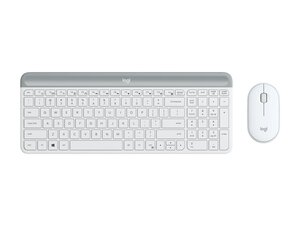
MK470 Slim Wireless Comboは、省スペースのデスク環境や静かなタイピングに適した、超薄型キーボードとコンパクトマウスのセットです。キーボードには、快適で静かなタイピングを実現する薄型のシザーキーが採用されており、マウスは日常的な使用に適した形状になっています。Logitechは製品シリーズ全体でサステナビリティと耐久性の高い素材を重視しており、堅牢なプラスチックや可能な限りリサイクル素材を使用した筐体を採用しています。主な特長として、スリムな形状、コンパクトなUSBレシーバーによる2.4 GHzワイヤレス接続、複数のカラーバリエーションが挙げられます。
モデルの識別方法
Logitech MK470は、モデル番号 (M/N CU0026) で識別できます。モデルラベルは製品パッケージおよび製品ページに記載されています。このラベルには、モデル (M/N)、パーツ (P/N)、シリアル (S/N) 番号が記載されています。
特長
- フォームファクタ: スリムワイヤレスキーボード + コンパクトワイヤレスマウスのセット
- キーボードレイアウト: 英語US (QWERTY) – 薄型レイアウト
- モデル / SKU: コンボSKU: 920-009443 (オフホワイト)、920-009437 (グラファイト)、920-011311 (ローズ)
- 接続: コンパクトなUSBナノレシーバーを使用した2.4 GHzワイヤレス (Logitech独自のワイヤレス方式) – プラグアンドプレイ対応
- ワイヤレスレシーバーモデル: コンパクトUSBナノレシーバー (製品ページにはメーカーモデル番号の記載なし)
- スイッチ: 薄型シザー (メンブレン) キースイッチ。正確なスイッチのメーカー/モデルは製品ページに記載なし
- 電源 / バッテリー: キーボードとマウスともに交換可能なバッテリーを使用。正確なバッテリーセルタイプおよびバッテリー駆動時間は製品ページに記載なし
- 素材: 耐久性のあるABSプラスチックを使用。Logitechのサステナビリティに関する注記によると、リサイクル素材のプラスチックが使用されており、長寿命と最小限の厚みに重点を置いた設計となっています
- 互換性: レシーバー用の標準USB-A入力端子を備えたシステムと互換性あり。一般的なWindowsおよびmacOSとの互換性 (Logitechの製品ファミリガイダンスに基づく)
- パッケージ内容: キーボード、コンパクトマウス、USBナノレシーバー、説明書 (バッテリーおよび付属品は地域により異なります)
トラブルシューティング
修理に関連して最も一般的な不具合は、ワイヤレス接続が切れる問題 (多くの場合、消耗したバッテリー、レシーバーの不適切な接続、または電波干渉が原因) や、液体こぼしや衝撃によるキーやマウスの物理的な故障です。接続の問題を診断するには、バッテリーの交換、USBレシーバーの再接続、電源スイッチの切り替えを行い、別のコンピューターでテストしてください。デバイスの電源が入らない場合は、バッテリー筐体および端子に腐食や変形がないか確認してください。
その他のトラブルシューティングについては、https://support.logi.com を参照して、製品サポート、問い合わせ先、地域別のヘルプ記事を確認してください。
その他の情報
Warranty Info
=== 製品保証 ==
製品保証は地域によって異なります。保証条件や請求手順については、Logitechの製品保証情報 (https://support.logi.com/warranty) を確認してください。

