フォーラムで人気の質問
質問する質問はありません。 最初の質問をしてみましょう!
ドキュメント
背景
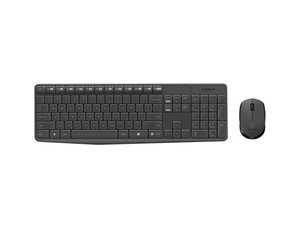
MK235は、日常的な生産性と長寿命を目的に設計されたフルサイズワイヤレスキーボードと両利き対応マウスのセットです。ロジクールの持続可能性への取り組みの一環として、耐久性のある素材と再生プラスチックを使用しています。主な特徴は、フルサイズのキーボードレイアウト、コンパクトな両利き対応マウス、プラグアンドプレイ接続のためのシンプルなワイヤレスUSBレシーバーです。デザインは、家庭環境とオフィス環境の両方における耐久性と使いやすさを重視しています。
識別方法
Logitech MK235はモデル番号(M/N CU0026)で識別できます。モデルラベルは製品本体およびパッケージに記載されています。このラベルにはモデル番号(M/N)、部品番号(P/N)、シリアル番号(S/N)が記載されています。
仕様
- フォームファクター: フルサイズキーボードと両利きマウス(ワイヤレスコンボ)
- 接続方式: ワイヤレス(USBナノレシーバー、2.4 GHz プラグアンドプレイ)
- スイッチタイプ: ラバードーム/メンブレンキー(Logitech独自メンブレン)
- キースイッチメーカー: ロジクール(独自開発メンブレン;製造元は別途明記なし)
- マウスセンサー: 光学式センサー(標準光学トラッキング)
- 電池: キーボード: AAA×2本; マウス: AA×1本(ユーザー交換可能)
- 素材とサステナビリティ: 耐久性のあるプラスチック製。製品ページに記載の通り再生プラスチック含有
- カーボンフットプリント: 推定8.058 kg CO2e(製品ページ記載値)
- 同梱物: MK235キーボード、MK235両利きマウス、USBナノレシーバー、電池(地域により事前装着または同梱)、取扱説明書
- ソフトウェア&サポート: 専用ダウンロードは記載なし。互換デバイス向けにはLogitechサポートページおよびLogitech Options+でサポート
トラブルシューティング
修理に関連する一般的な不具合には、電源が入らない原因となる電池接点の不良/劣化、レシーバーやRF干渉による無線接続の不安定、異物や液体の付着によるキーの固着/反応不良などがあります。電池交換、USBレシーバーの差し替え/別ポート・デバイスでの動作確認、電源スイッチの確認、キーキャップを外してスイッチや接点の点検やクリーニングを行ってから診断してください。
追加のトラブルシューティングについては、製品サポート、FAQ、お問い合わせ方法が掲載されている https://support.logi.com をご覧ください。
追加情報
保証情報
保証内容は地域によって異なります。保証条件の確認および請求手続きについては、Logitechの保証ページをご確認ください。
以下の翻訳者の皆さんにお礼を申し上げます:
100%

Midori Doiさんは世界中で修理する私たちを助けてくれています! あなたも貢献してみませんか?
翻訳を始める ›
