
スピーカー
この翻訳は機械によって生成されたものであり、人間による校正は行われていません。母国語は日本語ですか? 翻訳を校正する。
|
3件の回答 1 スコア |
My tablet is showing => FASTBOOT MODE on the screen what should I do? |
|
2件の回答 1 スコア |
Why is my acer tablet not turning on |
|
2件の回答 1 スコア |
My tablet touch screen is cracked what should I do? |
|
1 件の回答 0 スコア |
Why is my screen touch malfunctioning? |
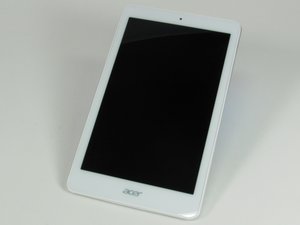
Acer Iconia Tab 8 A1-860は、画面周囲に白いフレーム、背面がシルバーグレーの8インチタブレットです。重量は12.7オンス(約360 g)、サイズは8.5 x 5.1インチ(約21.6 x 13.0 cm)です。背面に小さな正方形の「Intel Inside」ステッカーが貼られています。画面下部前面と背面に「Acer」のロゴがあります。背面の左上部にmicro SDカードスロットがあります。本体上部にmicro USBポートとヘッドフォンジャックがあります。
Acer Iconia Tab 8 A1-860タブレットは、本体下部にある白いラベルに記載されているモデル番号とシリアル番号で識別できます。タブレットの識別に関する詳細については、Acerサポートページをご覧ください。
FIX-SUOVANEN-S16S1G1
3 メンバー
12のガイドは作成済み
過去 24時間: 2
過去 7 日: 6
過去 30 日: 37
今までの合計 5,010


