
 2
2 Microphone and speakers have disappeared from sound preferences
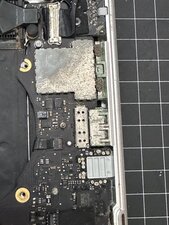
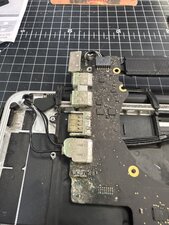
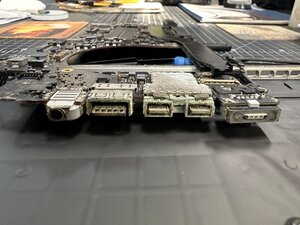
I have scoured the internet trying to find out why both my internal microphone and speakers have disappeared from the input output in sound preferences? I have tried all resets everyone have suggested to do with no luck, I think I have narrowed it down to the i/o board that my 3.5mm headphone jack is connected to, but not sure? Has anyone else had this happen?
Update (11/12/25)

 338
338  974
974 
Were you using any headphones just before this issue happened, or had any reason to disconnect any internal connections? Or is this just a sudden occurrence? Try running diagnostics at boot by holding down the D key until the globe appears and follow the prompts and see what it says (Have the charger plugged in during this process). I presume SMC & PRAM resets have been tried without any success.
livfe さんによる
@livfe No, haven't used headphones for years. Always used a bluetooth device. I first noticed the problem one day (a few months ago) when I turned on my MacBook and did not hear the usual startup sound. I thought it had something to do with using bluetooth devices? Removed all devices, no difference. So I have been doing internet searches and trying all the software resets everyone suggested. But about a year ago now, I did have to replace the MagSafe power cable (110v) as I found the one that came with the laptop was extremely hot, both the connection with the orange/green light on it and that whole side of the MacBook to the headphone jack.
Al Sadler さんによる
@alsadler The correct charger should be an 85w Mag safe II T-Type.. Did you check that the charging port is clean of dirt and debris as this can also make the charger get 'hot' and overheat. A PRAM reset (OPT+CTRL+P+R) and let it boot chime 2x then release, that should make it chime again. I use the same model and the boot chime sometimes has gone away also after using a BT headset, odd yes, Apple thing no doubt.
livfe さんによる
@livfe So for the charger I went to an Apple authorized store here in Martinique and got the replacement, as soon as I did that the hot plug and left side of MacBook has stopped. I would think the one I had was also Apple as it came with the laptop 6 years ago? I know I've tried the PRAM reset before, and as I said earlier, I don't get those boot chimes anymore so I don't know when 2x has happened?
Al Sadler さんによる
@alsadler Do the PRAM reset again and keep holing the keys to let it reset 2 or 3x as that usually brings back the chime, which in turn may bring back the speakers in the audio panel. Failing that, the next step I would try would either be a clean install or installing a system to an external drive and boot from that to see if the speakers appear again. If that failed then there is the probability that there may be a board level diagnostic required and a potential professional fix required. If you do go for a clean install, remember to 'select all devices' from the view option in disc utility and erase the drive from the top level. Of course make a backup of your files beforehand as they will all be erased in the process.
livfe さんによる
5件以上のコメントを表示