

My computer won't boot. Surcure Boot won't load.
My computer won't boot. Surcure Boot won't load.
評価: 550.1千
 11
11
 424
424
 1.6千
1.6千
Hi @wilkil
Won't boot or won't start, there is a difference.
Either way try a full power refresh and check if that resolves the problem.
When the RTC coin cell battery has been removed, measure its voltage. If it is <2.5V DC or if the battery is >4-5 years old, replace it. Search online for Lenovo IdeaPad 110-15ACL CMOS Bios Battery to find battery suppliers that suit you best. (examples only)
If the laptop turns on OK, there might be a message stating that the date and time are incorrect. This is normal as the BIOS has been reset back to default by the above procedure. Once the date and time have been corrected, the message won't appear the next time the laptop is started. Also if any user definable BIOS settings were changed by you to suit whatever system requirements were needed, they will need to be changed back again as well.
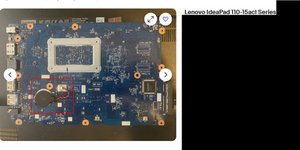
(click on image)
このアンサーは役に立ちましたか?
評価: 860.9千
1.4千
978
2.4千
@wilkil you may have to reinstall your OS. I would start off by trying to set the BIOS to boot from USB drive and then use a bootable USB drive. See if that gets' your computer to boot. You may then access the current data drive and see what issues it may have, and possible restore your OS.
To work on your computer and how to set it up, use the Lenovo IdeaPad 110 15ACL Hardware Maintenance Manual
このアンサーは役に立ちましたか?
評価: 1
3
3
Well I will suggest you to checkout the following video: https://www.youtube.com/watch?v=I65j7U6m...
このアンサーは役に立ちましたか?
過去 24時間: 0
過去 7 日: 1
過去 30 日: 8
今までの合計 205




