メインコンテンツにスキップ

iPad 2 Touch Screen Replacement Video tutorial

アーカイブされたガイド
このガイドは将来的な使用のためにのみ保存されてます。ご自身の修理作業には更新バージョンをご利用ください。

必要な工具と部品

ビデオの概要

  1. iPad 2 Touch Screen Replacement Video tutorial, Front Panel Assembly: 手順 1、 2の画像 1 iPad 2 Touch Screen Replacement Video tutorial, Front Panel Assembly: 手順 1、 2の画像 2
    • Use the edge of a plastic opening tool to carefully flip up the retaining flaps on the two digitizer ribbon cable ZIF sockets.

    • Be sure you are prying up on the hinged retaining flaps, not the sockets themselves.

    • The retaining flaps are highlighted in red in the second picture.

  2. iPad 2 Touch Screen Replacement Video tutorial: 手順 2、 2の画像 1 iPad 2 Touch Screen Replacement Video tutorial: 手順 2、 2の画像 2
    • Use the edge of a plastic opening tool to peel the digitizer cable off the shields on the logic board.

    • Carefully pull the digitizer cable off the adhesive securing it to the side of the rear case.

  3. iPad 2 Touch Screen Replacement Video tutorial: 手順 3、 1の画像 1
    • Pull the digitizer ribbon cable straight out of its two sockets on the logic board.

  4. iPad 2 Touch Screen Replacement Video tutorial: 手順 4、 2の画像 1 iPad 2 Touch Screen Replacement Video tutorial: 手順 4、 2の画像 2
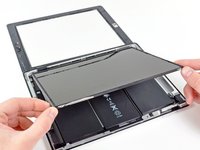
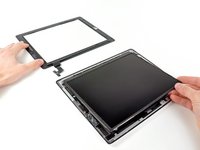
    • In order to remove the front panel assembly, the ribbon cable needs to slide out between the case and the LCD. You'll need to move the LCD to make some room.

    • Be very careful when moving the LCD, and do not attempt to remove it from the iPad—its cable will remain connected while it is rotated over.

    • Lift the LCD from its long edge farthest from the digitizer cable and gently flip it toward the rear case—like closing a book.

    • While holding the LCD up, gently slide the front panel away from the iPad. Be careful not to snag the digitizer cable on the rear case or LCD.

    • Set the LCD back into the body for safekeeping.

終わりに

To reassemble your device, follow these instructions in reverse order.

4 の人々がこのガイドを完成させました。

作成者

2人の作成者と共同で作成されました。

ZFix

メンバー登録日: 12/09/13

195,943 ポイント

330のガイドは作成済み

チーム

Master Techs Master Techs人のメンバー

Community

329 メンバー

1,452のガイドは作成済み

1件のガイドコメント

We replaced the screen successfully and it turns on all looks beautiful except the touch screen isn’t working at all—any thoughts? We are beginners

shelley fiedler - 返信

コメントを追加

統計データ:

過去 24時間: 0

過去 7 日: 0

過去 30 日: 3

今までの合計 4,552