メインコンテンツにスキップ

Weinmann VENTImotion and VENTIlogic Display Board Replacement

医療機器
この修理ガイドは医療機器メーカーからの是認を得ておらず、iFixitと医療機器メーカーは提携していません。

必要な工具と部品

  1. Weinmann VENTImotion and VENTIlogic Display Board Replacement, Display Board: 手順 1、 2の画像 1 Weinmann VENTImotion and VENTIlogic Display Board Replacement, Display Board: 手順 1、 2の画像 2
    • Open the device by following these steps:

    • Place the device on a non-slip surface with the top facing downwards

    • Remove the filter cassette from the top part of the housing.

    • Undo and remove the 6 screws (34).

    • Open the bottom of the housing (35) away to the side.

    • Undo the connecting cables for the humidifier (42) and the alarm (43).

    • Make sure the power supply plug is disconnected.

  2. Weinmann VENTImotion and VENTIlogic Display Board Replacement: 手順 3、 1の画像 1
    • Disconnect the following:

    • encoder connector (82).

    • connectors of interfaces (84) and (85) off the control board.

  3. Weinmann VENTImotion and VENTIlogic Display Board Replacement: 手順 4、 1の画像 1
    • Disconnect the ribbon cable of the display and the fascia film.

    • Pull the latch out until you feel resistance. You can then pull out the ribbon cable.

    • If the latch has not been opened correctly, the ribbon cable may be damaged when it is pulled out.

  4. Weinmann VENTImotion and VENTIlogic Display Board Replacement: 手順 5、 1の画像 1
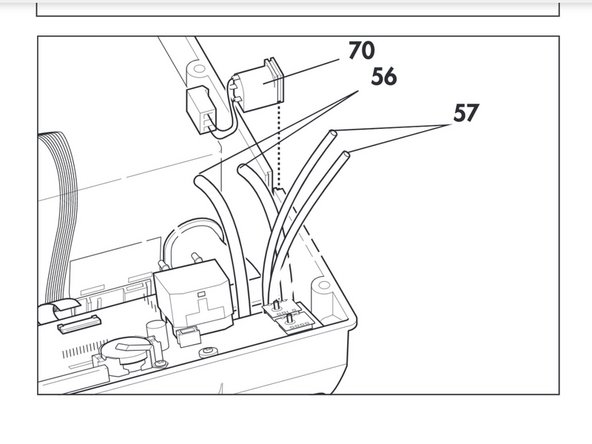
    • Pull flow measurement hoses (56) off the flow sensor.

    • Pull pressure measurement hoses (57) off the pressure sensors.

  5. Weinmann VENTImotion and VENTIlogic Display Board Replacement: 手順 6、 1の画像 1
    • Undo the four screws (51) and remove control board (50).

  6. Weinmann VENTImotion and VENTIlogic Display Board Replacement: 手順 7、 1の画像 1
    • Remove spring (54) from the control board and remove battery (52) (see "7.9 Replace battery on control board" on page 42).

    • Remove display

  7. Weinmann VENTImotion and VENTIlogic Display Board Replacement: 手順 9、 1の画像 1
    • Insert a new display (49).

    • The display may not tilt and must be straight in the guides.

終わりに

To reassemble your device, follow these instructions in reverse order.

作成者

2人の作成者と共同で作成されました。

Cameron Young

メンバー登録日: 04/22/19

174 ポイント

1ガイドが承認済み

チーム

Cal Poly, Team S7-G19, Paton Spring 2020 Cal Poly, Team S7-G19, Paton Spring 2020人のメンバー

CPSU-PATON-S20S7G19

3 メンバー

4のガイドは作成済み

0件のガイドコメント

コメントを追加

統計データ:

過去 24時間: 0

過去 7 日: 1

過去 30 日: 5

今までの合計 162