メインコンテンツにスキップ

Roccat Vulcan II Mini Air Backplate Replacement

必要な工具と部品

  1. Roccat Vulcan II Mini Air Backplate Replacement, Backplate: 手順 1、 3の画像 1 Roccat Vulcan II Mini Air Backplate Replacement, Backplate: 手順 1、 3の画像 2 Roccat Vulcan II Mini Air Backplate Replacement, Backplate: 手順 1、 3の画像 3
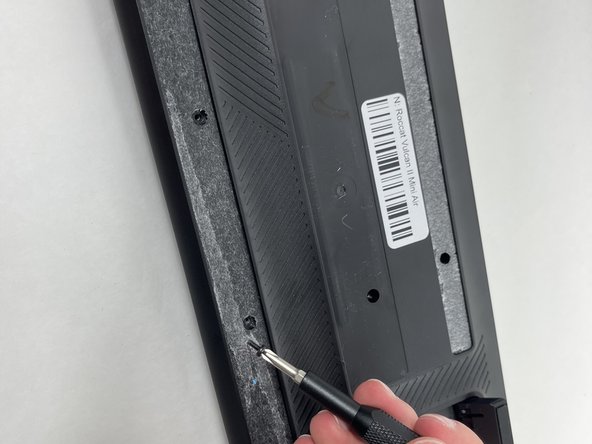
    • Flip your keyboard over so the bottom is facing up.

    • Before you begin, gently peel the sticker in the center and rubber strip that runs along the bottom and top to expose all the screws.

    • Be sure to save the rubber screw covers for reinstallation when you're finished.

    • Use a Phillips #0 screwdriver to remove all of the screws from the back plate.

    • Keep the screws for the replacement.

  2. Roccat Vulcan II Mini Air Backplate Replacement: 手順 2、 3の画像 1 Roccat Vulcan II Mini Air Backplate Replacement: 手順 2、 3の画像 2 Roccat Vulcan II Mini Air Backplate Replacement: 手順 2、 3の画像 3
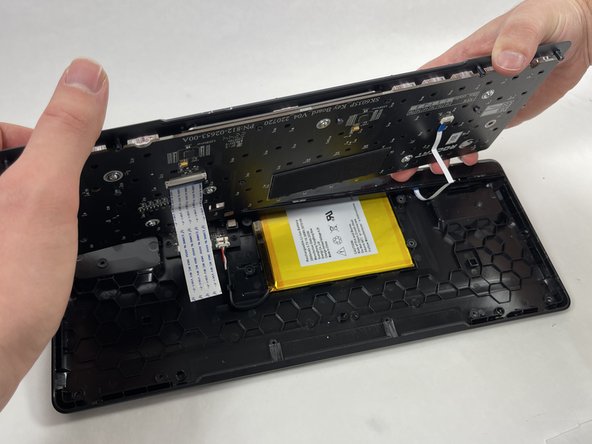
    • With the screws removed the backplate will be loose and can be removed. Be careful, as it is still attached to the switch plate with ribbon cables so don't pull it.

    • Gently lift the switch plate from the backplate, setting them next to each other with the ribbon cables facing upwards.

    • Use a spudger or a clean fingernail to flip up the locking flaps of the two ZIF connectors using the widest tool possible to avoid damaging the delicate hinge pins.

    • This is the unlocked position.

    • Use tweezers or your fingers to gently pull the cable out of its socket by the pull tab.

    • You could damage the cable by gripping it directly.

終わりに

To reassemble your device, follow these instructions in reverse order.

ある他の人がこのガイドを完成しました。

作成者

2人の作成者と共同で作成されました。

Ethan Mueller

メンバー登録日: 10/22/24

162 ポイント

1ガイドが承認済み

チーム

UMass Dartmouth, Team 3-3, Santin Fall 2024 UMass Dartmouth, Team 3-3, Santin Fall 2024人のメンバー

UMASSD-SANTIN-F24S3G3

4 メンバー

4のガイドは作成済み

0件のガイドコメント

コメントを追加

統計データ:

過去 24時間: 0

過去 7 日: 6

過去 30 日: 25

今までの合計 327