はじめに
Use this guide to replace the power button Digiland 10.1” DL1016 tablet.
A functional power button will power the device on or off when pressed once. Over time a power button may become stuck or unresponsive if debris gets under the power button assembly or has faulty wiring.
For the replacement of the power button, you will need to know how to solder/desolder connections. Please review this guide to follow the proper soldering technique to complete this replacement. はんだ付けとはんだ除去の作業ガイド
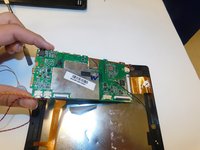
Step 6 requires you to remove the motherboard from the device, next you will need to desolder the power button and solder a new one in place.
Before beginning the replacement make sure the power off the device and disconnect any external power.
必要な工具と部品
-
-
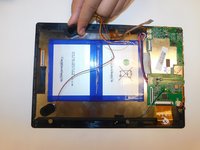
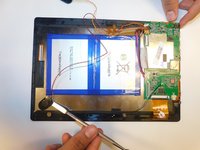
Use an opening pick and an opening tool to pry the backing off the back of the tablet.
-
-
-
手順3 Digiland 10.1'' DL1016 Disconnect Wires going off the Motherboard
注意: 手順 3 は、作業進行中としてマークされている ガイド から引用されています。
-
Gently pull the wiring back.
-
-
-
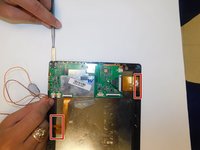
Disconnect the black cable off the motherboard.
-
Remove the four 1.5mm Phillips #000 screws from the motherboard.
-




To reassemble your device, follow these instructions in reverse order.
ある他の人がこのガイドを完成しました。



チーム

Gateway, Team S1-G2, Saknee Fall 2019 Gateway, Team S1-G2, Saknee Fall 2019人のメンバー
GCC-SAKNEE-F19S1G2
4 メンバー
5のガイドは作成済み
4件のガイドコメント
I want to know if ebay cheap 1 count usb charge port. Is okay to buy 4 This tablet. It is $3 or less & is all I need, I think. Just broke my tablet way worse on sloppy job of screen replacement , but it look ok. You see lint hair, etc underneath when screen off at an angle close uo is all & ruined power button area ceazy glue, etc mess I have to press down hard with something & now on top of all, the charger chord at same time plys charge lose all of a sudden so it isnt really charging or a hassle & if it is it turns off while playing on a game. etc. Now it is not even turning on. Just tries, but doesn't. At least b4 it was. I took it apart to see the charge port . Good thing its not a cable type & can easily replace for cheaoer then one too. I has wrong battery reading or diff on screen off then on have 2opush down, but charge port lose. I don’t know if replacing will fix it or it has other issue when I messed up the power button. I need 2 try the port till I can buy other tablet. If I had not broke it been okay. Lesson learned
How do you reconnect the black cable mine won't go back on
What if the connection with the black cable broke off of the motherboard Is there a way to fix it I bought Kapton tape would that work?
