メインコンテンツにスキップ

Casio FX-991EX Battery Replacement

必要な工具と部品

  1. Casio FX-991EX Battery Replacement, Remove the battery cover: 手順 1、 2の画像 1 Casio FX-991EX Battery Replacement, Remove the battery cover: 手順 1、 2の画像 2
    • Remove the battery cover's screw using a Philips #0 screwdriver.

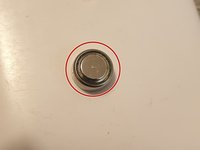
  2. Casio FX-991EX Battery Replacement, Remove the battery: 手順 2、 2の画像 1 Casio FX-991EX Battery Replacement, Remove the battery: 手順 2、 2の画像 2
    • Use a spudger to remove the battery using the gap to the right.

    • Don't use sharp objects that may cause harm or damage. The battery can be hard to pop out, but will do so. Dispose of a damaged battery via an e-waste collection site.

  3. Casio FX-991EX Battery Replacement, Replace the battery: 手順 3、 2の画像 1 Casio FX-991EX Battery Replacement, Replace the battery: 手順 3、 2の画像 2
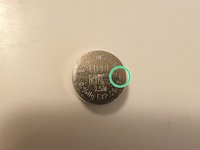
    • The FX-991EX uses a 1.5V LR44 battery.

    • Slot the new battery into the compartment. Ensure that the positive side (with writing) faces up...

    • And the negative side faces the calculator's screen.

  4. Casio FX-991EX Battery Replacement, Screw the cover back on: 手順 4、 1の画像 1
    • Slot the battery cover back on and screw it down.

終わりに

If you need to reset the calculator after this, it's SHIFT+9 > 3 > =.

Otherwise, you're ready to crunch numbers again!

4 の人々がこのガイドを完成させました。

作成者

1人の作成者と共同作成されました。

FarmYard Gaming

メンバー登録日: 08/27/20

1,850 ポイント

1ガイドが承認済み

4件のガイドコメント

Just discovered during a lecture that my battery has become a spicy pillow - if you're leaving this in storage be careful and monitor it, lest it explode and/or warp the case irreparably.

FarmYard Gaming - 返信

Which size of screws

李生山 -

I found nothing in the slot. What can i do?

UTL Shaion - 返信

Do you see any wires connecting the battery to the circuit board? I don’t see any on mine. Both of ours may be fake lmao

Ivan Liu -

コメントを追加

統計データ:

過去 24時間: 27

過去 7 日: 182

過去 30 日: 891

今までの合計 22,122