
メインコンテンツにスキップ

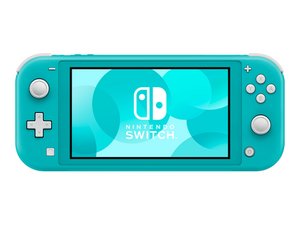
廉価版で携帯バージョン、統合されたJoy-Conコントローラと若干縮小したスクリーンを持つNintendo Switchハードウェアです。2019年9月20日発売。

Replaced Game Card Reader and Still Not Reading Cards

I started getting the "game card could not be read" error and replaced card reader. Still having the same issue. All connections seem to be properly connected. I've tried multiple cards just to be sure it wasn't an issue with the game. I would love to hear any ideas on what else I might consider looking at to trouble shoot further.

Thanks

この質問に回答する 同じ問題があります

この質問は役に立ちましたか?

スコア 1
コメントを追加

1 件の回答

I've seen this happen many times, especially with the Switch Lite. With the back metal cover removed, gently press down on the clip area where the game card slot connects. Then insert a game and see if the system recognizes it.

このアンサーは役に立ちましたか?

スコア 0

3 件のコメント:

Hi! Just to add:

Try to clean the game card reader with isopropyl alcohol as well. If both failed, then please replace the game card reader! You can follow this guide: Nintendo Switch Lite マザーボードの交換 (till step 16) remove the heatsink and then the game card reader! If you need a more specific guide, please let us know!

さんによる

Unfortunatley that didn't seem to change anything. I have double checked to make sure all ribbons are properly connected and tried both the original and the new card reader to double check.

さんによる

Maybe the replacement part is faulty as well. I would try another one and see how it goes. Usually this is really related to the reader..

さんによる

コメントを追加

回答を追加する

Runtus_Maximus さん、ありがとうございました!
統計データ:

過去 24時間: 1

過去 7 日: 14

過去 30 日: 67

今までの合計 187