メインコンテンツにスキップ

Roku remote packed with features! Volume control, headphone jack, rechargeable battery and Voice Search.

How can I Disable the Microphone Permanently?

I hate the dang thing, pressing it accidentally, always worrying about if it's spying on me.

Not to mention my religious beliefs compel me to disable if possible, for the above reasons.

回答がありました! 回答を表示 同じ問題があります

この質問は役に立ちましたか?

スコア 0
コメントを追加

1 件の回答

ベストアンサー

That should be fairly simple and the device teardown shows you exactly what you need to do. I'll take you through it step by step.

Roku RC-MC1 remote Teardown - iFixit

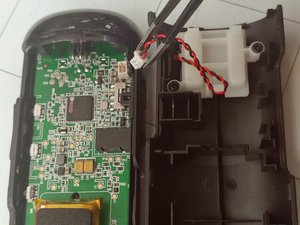
Follow Step 2 to open up the shell. Now on step three you can skip the first picture of disconnecting the battery, instead go to the second photo that shows how to disconnect the microphone.

Block Image

Unplug that and you've accomplished your goal! Now all you have to do is clip the shell back together and you can enjoy the peace of mind knowing it can no longer hear anything you have to say. If you feel ambitious or concerned you can remove the microphone altogether, but simply unplugging it will do the job.

このアンサーは役に立ちましたか?

スコア 1

2 件のコメント:

This is incredibly helpful, much more quick and precise than I expected, thank you! And my apologies for underestimating iFixit users!

さんによる

I don't think this is a correct answer to the question of how to permanently disable the microphone on a Roku remote control. The connector shown in step 2 seems to be the speaker connector. The microphone is soldered onto the other side of the printed circuit board - right behind the hole in the remote below the power button.

さんによる

コメントを追加

回答を追加する

fiaTheFae さん、ありがとうございました!
統計データ:

過去 24時間: 0

過去 7 日: 14

過去 30 日: 87

今までの合計 521