メインコンテンツにスキップ

Logicool MX Anywhere 3 ポータブルワイヤレスマウスの修理・分解情報です。2020年に発売され、モデル番号910-005987で識別されます。

Click is not working

Hello everyone!

Well, I have MX Anywhere 3 and I have now this issue: left side is not clicking. You need a stronger click/click in a precise spot of this side of the mouse to make the click work. I have this product for more than 5 years now. I saw there are some videos about how to fix it at home... and I am a bit afraid buying the tools/paying someone to fix it and then having the issue again...
Do you guys have any tips or instructions that I could follow to solve this problem? Have you faced this problem as well? Is really worth fixing it?

Thank you very much.

この質問に回答する 同じ問題があります

この質問は役に立ちましたか?

スコア 1
コメントを追加

3件の回答

最も参考になった回答

@amandazorzhan "bit afraid buying the tools/paying someone to fix it" first off you are not going to pay anyone. This is ifixit where YOU are empowered to fix it yourself. You can absolutely do it. You know to use this excellent guide ロジクール Logitech MX Anywhere 3の開口方法 and not some shaky youtube video ;-)

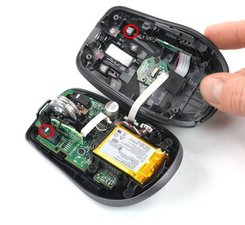
Now this "need a stronger click/click in a precise spot" sounds like an issue with the micro switch. It could just be that the plastic is starting to wear a bit. 5 Years is actually a really good life expectancy. Now, once your mouse is apart, take a look at those pieces.

Block Image

If you find that they have worn. Get some nice adhesive and just add some "mass" to it. I commonly use little felt pads from the larger department stores and cut a small piece and glue it on top. Less rigid gives a better mileage :-)

There is a whole community of fixers here that is willing to help you, if needed. No worries, You got this!

Repair is War on Entropy!

このアンサーは役に立ちましたか?

スコア 2

3 件のコメント:

After I reassembled my MX Anywhere 3 mouse, when I turn on the switch, the LED at the back of the mouse wheel only blinks red. I have already tried charging it, but the red LED keeps blinking whether it is charging (with the power switch turned on or off) or not charging (with the power switch turned on). Additionally, the LED on the Bluetooth switch, which has 3 options to connect up to 3 devices, no longer turns on. Does anyone can help me?

さんによる

I added two layers of regular adhesive tape and it did the trick. Thanks!

さんによる

I added four layers of Scotch tape, and it seems to be working well. that does wear out because it does compress over time so you might need to do it again

さんによる

コメントを追加

Hi Amanda, I believe the only way is to open it up and clean the button with rubbing/ isopropyl alcohol. One think you could try is using compressed air to clean under the area.

このアンサーは役に立ちましたか?

スコア 0

1件のコメント:

After I reassembled my MX Anywhere 3 mouse, when I turn on the switch, the LED at the back of the mouse wheel only blinks red. I have already tried charging it, but the red LED keeps blinking whether it is charging (with the power switch turned on or off) or not charging (with the power switch turned on). Additionally, the LED on the Bluetooth switch, which has 3 options to connect up to 3 devices, no longer turns on. Does anyone can help me?

さんによる

コメントを追加

I've tried both usual methods, using lubricant on the micro buttons inside the mouse and blowing air inside, but neither worked.⏎
I also noticed that if I use the mouse without the cover, the left click and double-click work fine, so the problem isn't with the buttons inside but with the buttons on the cover.

このアンサーは役に立ちましたか?

スコア 0
コメントを追加

回答を追加する

Amanda Zorzhan さん、ありがとうございました!
統計データ:

過去 24時間: 26

過去 7 日: 204

過去 30 日: 748

今までの合計 8,762