メインコンテンツにスキップ
リペアコミュニティに参加 - アカウントの作成

モデル番号はA1706 / EMC 3071ー2017年6月発売。この13インチMacBook ProはKaby Lakeプロセッサが搭載されています。最大4.0 GHzのTurbo Boost付き3.5 GHz Core i7です。

Is it posible replace a cooked t-con board?

Hello everyone;

First of all, sorry for my bad english. ?

The case is that i have a macbook pro 13 with touchbar 2017 with the famous screen problems. Is the second time that i have problems with the screen. My first case was that i broke the lcd. In this time, after read a lot cases in the forum, i think the problem is that t-con board is cooked. I can see a lot of horizontal green and pink lines.

So here is my question: can I replace the cooked t-con board with the good condition t-com board from my old broken lcd?

この質問に回答する 同じ問題があります

この質問は役に立ちましたか?

スコア 3
1件のコメント

Your English and diction are fine. It's your punction (like my own ) that sucks but to the issue. Yes and no . You can but you have to replace LCD panel again. Get your money back and get a new one from someone else. Try an OEM used part. I could be wrong but you went with a substandard one made in elsewhere in China. Hope this helps.

さんによる

コメントを追加

5件の回答

最も参考になった回答

Yes, I perform these repairs. You need to make sure the T-CON board is the same model. Also you need to have a high level of experience and the right tools for the job or you’ll just make a mess of it. If you mess up the cables coming out of the LCD it’s game over.

このアンサーは役に立ちましたか?

スコア 6

9 件のコメント:

Lonny - Where are you getting the needed T-CON boards??

Apple does not make them available as a spare even to their repair depots and I've asked a few folks in Shenzhen China and they tell me they can't be found and any you do find are from used displays so they may be defective (taking your chances).

So while it is technically possible to replace, finding a good replacement part is just not possible.

さんによる

@danj You're correct, it's almost impossible to find replacement boards. I save many of the parts from old displays for my own repairs. If it were not for those parts I'm not sure where you would find them. I know Rossmann Repair Group used to have a box full of T-CON boards, but I think they only keep them for internal use as well. If they even still save them at all. Maybe give them a call.

さんによる

@Kali Meli - Just because there is a glimmer of hope in just replacing the T-CON board, the possibility of finding the needed part that is even good is extremely rare! Remember a used part will likely be from a burnt display, by someone thinking they can sell you junk! Buyer beware!

Trust me its best to just get a new full assembly then trying to patch yours up.

The last shoe here is you need very good micro-soldering skills to desolder the ribbon cables without damaging the cables or the board.

さんによる

The question was “ can I replace the cooked t-con board with the good condition t-com board from my old broken lcd?”. The answer is most certainly “Yes” …. Is it something that you can find the parts for or that you might have the proper tools or skills to perform? In many cases no. Because displays are so expensive and in some cases hard to find, sometimes it’s worth the extra time it takes to try a repair such as this, especially if your experience and access to parts will afford you the ability to do so. Often experience will also guide you to know if it’s a repair that’s even worth performing.

さんによる

@Lonny Gallant - There is a difference in your skill set (and mine) from most people who are asking for help here.

We are brain surgeons so this type of repair is not hard for us. For a tire mechanic it is a long stretch!

Scaling the answer is just as important than the 'sure no problem' without filling in the details.

さんによる

4件以上のコメントを表示

コメントを追加

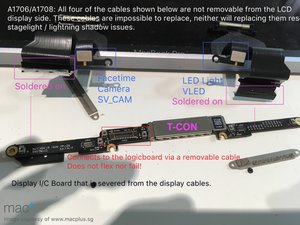
Sorry its not possible! The T-CON is hardwired to the ribbon cables and then onto the LCD panel (fused to the glass panel via two ribbon cables). Review this image:

Block Image

Photo credit: @just1ed www.macplus.sg

The purple ID’d connections are not accessible without damaging the cables.

このアンサーは役に立ちましたか?

スコア 1

4 件のコメント:

i will bet on the 2 data flat flexes on the sides of the lcd (not the camera and backlight flex)... they go bad and the issue is named #dustgate nowadays. These are fixable but need precise microsoldering experience...

or permanent or long term solution is to change both data flexes. For that you have to take out lcd panel out and solder new flexes

さんによる

@sajangurung - So far the LCD cables have not been the issue unless the clutch edge is banged hard damaging the cables.

さんによる

We have very high percentage of flex failures during repairs nowadays. Looks like lcd issue but are flex issues. There are micro punctures on the flex due to dust or for eg crumbs stuck between lcd and Topcase. Just google dustgate on Instagram or YouTube. You will find tons of them

さんによる

@sajangurung - The whole DustGate tag is so riddled with incomplete data it makes my head spin! So let’s compartmentalize some of this into issues which are real.

1 - HEAT

2 - EFFECTIVE COOLING

3 - BAD DESIGN

1 - The lack of care often leads to T-CON breakdown. This is often related to dust buildup within the fans and heatsink fins as well as running the system on a bed or rug so the vents are blocked.

2 - What the system is expected to run can often exceed what Apple expected! Video rendering being a leading use. A short run is not the issue it’s multiple long rendering sessions! Remember this is a system which is intended to extend one’s desk system not replace it! To be clear we are talking about the heavyweights not the lightweight users! This is where the user needs to pump up the cooling! I strongly recommend using TG Pro

3 - We recognized Apples failure with the 2016/17 systems backlight cable. You can find two detailed articles here. You will also find details on the failed Butterfly keyboards as well! We also caught the bad T-CON solder mess up which Apple to their credit addressed quickly! The issue was cold joints of the LCD ribbons to the T-CON.

ALL THE REST - Laptops are not tanks! As I pointed out, what I have seen is when the black clutch cover area gets a hard bang as well as people leaving objects on the upper case closing the lid crushing the glass chin plate which covers the ribbon cables. I have seen the glass shards cut the ribbons often! I’ve also seen half a beach inside! Beach sand is not the worst! Quarry sand is!

さんによる

コメントを追加

I replaced my cracked 2019 15" Macbook Pro A1990 screen with a 2018 A1990, and it works. While the screen's camera is in the hardware list, however, it isn't offered as a choice by the OS. I suspect the T2 chip is discriminating against the T-CON based on serial number or software version, and the OS software stack doesn't load because of this, but I'm only guessing. Because the software stack doesn't load, the knock on effect is that my iPhone won't load as a continuity camera. It seems from comments here that transferring T-CON PCB and/or it's chips won't work as they are mated to the specific screen hardware. Apple will give me a new screen for $1000+, but I'm not doing that. I'm wondering if I get a A1990 screen from another donor 2019 15" Macbook Pro, instead of a 2018, if I'll have success with the camera or will I run into the same issue? I want to stick with an Intel CPU for legacy software. p.s. True Tone options are missing too, but is of little concern to me.

このアンサーは役に立ちましたか?

スコア 0

3 件のコメント:

@ziggy9012769502 - The cameras firmware is getting in the way, this is why the transfer of the T-CON between the two systems won't allow the camera to work as the cameras firmware is a mismatch for the older T-CON board.

The issue in the question posted here is if one can transfer the T-CON board like for like. So while it's technically possible with the correct skills and tools 90% of the people reading this don't have either. Even still, TrueTone won't work afterwards as Apples serialization gets in the way. At the time we only had access to Apples Paywalled Calibration tool which required you bought the display from them. In newer macOS releases Apple caved in allowing you to re-serialize parts to the system, but I have not tried it on this series.

さんによる

Thanks DanJ. I mentioned that my iPhone wasn't being offered as a continuity cam, but It seems my iPhone is now acting as a continuity cam, or at least untethered. Maybe my OS reinstall/update helped/fixed something. I find it funny that a 2018 display worked for me, the more complex part of the equation IMHO, and the poor web cam doesn't. Oh well. iPhone web cam it is!

さんによる

@ziggy9012769502 - Half working is better than not working 😫 At least the more important part. Sorry!

You'll be surprised how many people use a iPhone or other external camera either tethered or wirelessly!

When I ran meetings I often had a standalone Web Cam as the MacBooks where just not very good back then.

さんによる

コメントを追加

On the 2017 MacBook Pro 13" (Touch Bar), the T-CON board is bonded and calibrated to its specific LCD panel at the factory. It isn’t designed to be swapped independently like older external displays. Even if you physically transfer the “good” T-CON from your broken LCD, it typically won’t work properly due to panel pairing, firmware calibration, and the delicate bonded connections. Horizontal green/pink lines usually indicate panel or display cable failure (common flexgate issue), not just T-CON damage. The practical solution is replacing the entire display assembly rather than attempting a T-CON board swap.

このアンサーは役に立ちましたか?

スコア 0

1件のコメント:

You're late to the party, and you are not fully correct!

I've replaced a few T-CON boards staying with the given model series. Clearly matching the board is important.

Yes, one needs to re-serialize the display on the 2018 and newer models and hopefully that also fixes the TrueTone issue as well when using the now supplied configuration tool in the newer versions of macOS. That's only been possible last year. But if you slide in the wrong T-CON the camera appears not to work just the same.

Even still this is not a repair for a first timer or even one who doesn't do this type of repair often as the skills need to be kept sharp besides having the proper tools. Besides it's just more economical to replace the full display assembly.

さんによる

コメントを追加

The problem you have described here has nothing to do with t-con board it self. You have damaged LVDS flex cable. But first to answer your question - yes , you can swap T-Con board, but you need to get it with same modification/software version . As lcd screens has been made in different factories, has different COG (Chip-On-Glass) configurations and so on… To do that - there is a QR code sticker with letters/numbers on it. It describes what software setup has been installed on t-con board. Usually in our repair shop - we salvage them from broken screens .

How to know is it T-Con , LVDS or Backlight flex problem?

T-Con common problems:

  • no back light
  • No pictue
  • Deformed picture
  • LVDS common problems :
  • no picture
  • Vertical lines
  • Discolouration
  • Backlight flex:
  • Not all LED has been lit
  • No backlight
  • To swap LVDS cable - you have to remove LCD from the housing without damaging the screen. Then you have to have some soldering skills to desolder old cable and solder new one.

このアンサーは役に立ちましたか?

スコア -1

5 件のコメント:

First this series uses iDP signaling not LVDS! Apple took the T-CON out of the display moving it into he body and the cables are not replaceable. Review the image above.

さんによる

@danj it is replaceable , thats what our business is basically living from - MacBook screen repairs, including new versions of macbooks , without losing True tone and other functions.

さんによる

@exe666 - I don’t see any clue of your business in your info card! How about writing up something that tells us what you fix and where you are located on this little planet we call 🌎 Earth.

In any case let’s use the correct terms, even when the cable physically looks the same it doesn’t mean it’s interchangeable. I use Zip cord for my speakers on my Stereo if someone where to patch in a power plug and used it my Stereo or speakers would have a hot time!

But you are correct the issue is not the T-CON directly but the backlight ribbon cables. Which is not the LVDS cable, it’s just the backlight ribbon cable we’ve documented here Class Action Lawsuit Filed Against Apple for MacBook Pro Flexgate Issue

I should add your list is in error on quite a few areas.

さんによる

Dan the flex cable is replaceble! The flex is soldered onto a basic pcb on back also!

さんによる

@emilludvigsson - Please fully read all of the answers and comments which dive into this a lot deeper. Replacing a given ribbon cable is not that simple! While one could find the backlight cable the needed work to open the display assembly and solder on the replacement is a lot harder and most people don't have the needed skills to do it. The display cables are even harder! And not available, this is where replacing the assembly is the better direction.

さんによる

コメントを追加

回答を追加する

Jordi さん、ありがとうございました!
統計データ:

過去 24時間: 2

過去 7 日: 32

過去 30 日: 159

今までの合計 9,130