
メインコンテンツにスキップ
リペアコミュニティに参加 - アカウントの作成

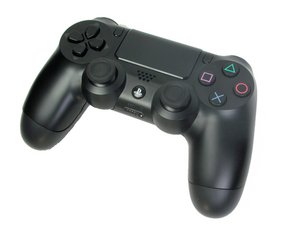
モデル:CUH-ZCT1は、2013年11月にSony Computer Entertainmentから発売されました。このコントローラはSix-axis、3.7 Vリチウムイオンバッテリーを採用しており、修理は複雑ではありません。

PS4 Controller not charging

My controller was fully functional until a month ago more or less when was the last time I used it, then it remained stored in my PS4 suitecase, then two nights ago I plugged it on my cell phone charger (Android, output 5V 1800 mA), I saw the orange light going on, so I turned around and went to sleep, the next morning I went to my friend's house and I gave him my controller so he could sync it with his PS4 but it didn't recognize it, so we thought his cable was the problem, when he tried with his controller, it charged it but not on mine, so I returned to my place, turned on my PS4 to find out my battery was almost dead, so I took it apart to check what the problem might be, to do so, I also took apart my another controller, replace the battery from one to another and both batteries charged in the good controller but neither in the defective one, so I discarded the battery problem, then I interchange the back part of the controllers (The one with the USB port with the ribbon cable on it) and to my surprise none of the controllers charged, when putting them back, again one controller was charging and the other one wasn't, so I'm not sure if my problem is in the USB board or my mother board, I hope someone can help me out with this issue since I've no money for a new controller. Ahh by the way the deffective controller is the camouflage edition (Gray and white) regards.

この質問に回答する 同じ問題があります

この質問は役に立ちましたか?

スコア 0
1件のコメント

Thank you Lucas, i'll verify the pins, hopefullythat will fix the problem, otherwise I'm thinking of ordering the USB board for replacement.

さんによる

コメントを追加

4件の回答

最も参考になった回答

You might want to check inside the usb connector to make sure none of the pins are bent or touching one another.

このアンサーは役に立ちましたか?

スコア 1
コメントを追加

Strangest thing, try using a USB battery. That’s the only way mine will charge.

このアンサーは役に立ちましたか?

スコア 1
コメントを追加

There is a small hole near L2,just press it.

このアンサーは役に立ちましたか?

スコア 0
コメントを追加

EDIT: Before assuming the BD92001 chip is dead, first try removing and then re-seating the ribbon cable from the touchpad module and if it still overheats or doesn't charge then it would more likely be the chip defected.

Sounds like you cooked the BD92001 chip on the controller motherboard. That chip seems to break when you charge on a fast charger (always charge on your ps4 with official cables to avoid this).

Replacing the BD92001 chip requires a hot-air/infrared rework station as the chip has a big ground pad underneath it which a common soldering iron just can't reach (maybe you can get it off the board but putting a new one on will be difficult unless you use a reflow oven or a rework station). A skilled and well-equipped electronics technician would be able to replace that chip within 15 minutes assuming they had the part in stock.

Here's a vendor I recently ordered the BD92001 chip from to do my own repair.
https://www.zedlabz.com/products/replace...
Note: I have a hot-air rework station and experience with SMD rework. If you don't have those then please seek a skilled technician that can do the repair for you.

このアンサーは役に立ちましたか?

スコア 0
コメントを追加

回答を追加する

sergio.a.aragon さん、ありがとうございました!
統計データ:

過去 24時間: 2

過去 7 日: 4

過去 30 日: 22

今までの合計 31,305