この翻訳は機械によって生成されたものであり、まだ人間による校正は行われていません。 日本語を話せますか? レビューはこちらから。

iPod Nano 第6世代のロジックボードアセンブリの交換

Andrew Bookholt とその他
最終更新日: 2026年8月14日
閲覧: 11万
統計データ:
- 過去24時間:
- 8
- 過去7日:
- 58
- 過去30日:
- 255
- 今までの合計
- 112,734
コメント: 22
手順に関する13件のコメント, 9件のガイドコメント
修理ガイドのコメントへ完了済み: 65 66
65人のユーザーがこのガイドを「完了」させました。あなたも加わりませんか?
あなたを含む、66人のユーザーがこのガイドを使って修理を「完了」させました。素晴らしいです!
お気に入り: 29 30
29人のユーザーがこのガイドをお気に入りに登録しています。あなたもリストに入れませんか?
あなたを含む、30人のユーザーがこのガイドをお気に入りに登録しています。
おすすめのガイド
このガイドはiFixitスタッフによって太鼓判が押されています。
はじめに
手順 1 に進む ↓このガイドを参照して、お持ちのNanoのロジックボードアセンブリを交換しましょう。
必要な工具と部品


-
-
-
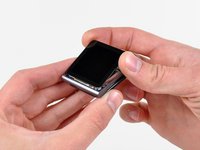
フロントパネルが温かいうちに、オープナーの端や糸ようじなどを使ってフロントパネルをヘッドフォンジャック側からこじ開け、本体から分離ください。
-
フロントパネルの左下にあるディスプレイケーブルを傷つけないように注意しながら、フロントパネル周囲についた接着剤を剥がしてください。
-
-
-
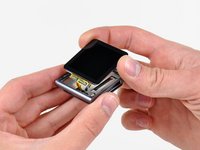
本体のヘッドフォンジャック側からフロントパネルを持ち上げてください。
-
ディスプレイデータケーブルが本体に引っかかっているので、左側を少し浮かせて本体から外してください。
-
-
-
-
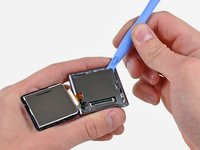
2本のケーブルが巻き込まれないよう注意しながら、フロントパネルアセンブリを取り外します。再度組み立てる際は、iFixitストアで買える両面テープを使うことができます。
-
-
-
-
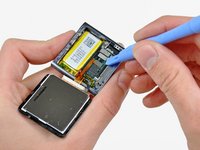
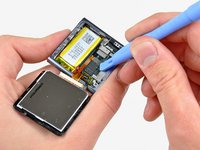
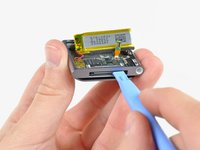
iPodオープニングツールを使用して、外装ケースに固定されている粘着剤からバッテリーを優しく上にこじ開けます。
-
親指でバッテリーをNanoの左側に引きながら、バッテリーの反対側の端を外装ケースから上にこじ開けます。
-
-
-
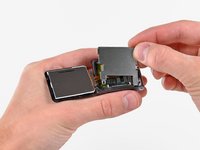
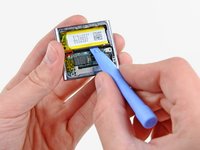
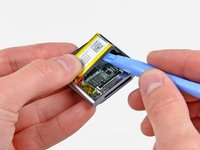
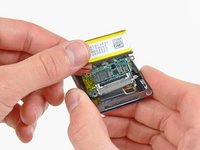
iPod用オープニングツールを使い、ドックコネクタをNanoの中心に向かってゆっくりと押し出します。
-
ヘッドフォンジャックアセンブリのケーブルを損傷しないよう注意しながら、ロジックボードアセンブリをNanoから取り外します。
-

 FixBotに聞いてみる










デバイスを再度組み立てるには、この説明書の逆の順番で組み立ててください。
65 の人々がこのガイドを完成させました。


9件のガイドコメント
Hi, i wonder if you could help me... I changed my cracked screen (my ipod worked even though the screen was broken) but then when I assembled the ipod ( I did everything you did) it doesn't work, nor does my computer recognize it anymore. Would you happen to know what might be the problem? Have I unintentionally somehow damaged it?
Thanks for the guide Andrew! I've just replaced my cracked screen and everything works flawlessly.
Hi..just to tell u about my ipod. It was accidentaly washed in my washing machine. I want to know..is the ipod still in function if i replace the battery only not the board. Im still hoping that my ipod still can be use. I love my ipod 6th generation. It has sentimental value to me..huhu
I did the very same thing, washed my 6th gen in the washer. when i realized what i had done, i immediately put the ipod in a tub of rice. now it works, but only when it’s plugged in. I’m pretty sure it’s the battery that needs replacing. I’ve not replaced the battery as all of the things i need from ifixit are out of stock. If everything on the ipod works except that it won’t hold a charge and stay on unless plugged in, then it’s most likely the battery and replacing it will probably fix the problem.
thefactory01 - 返信 共有
