メインコンテンツにスキップ
リペアコミュニティに参加 - アカウントの作成

iON SnapCam 1046 Lite Battery Replacement

必要な工具と部品

    1. iON SnapCam 1046 Lite Battery Replacement, Camera Lens and Cover: 手順 1、 2の画像 1 iON SnapCam 1046 Lite Battery Replacement, Camera Lens and Cover: 手順 1、 2の画像 2
      • Remove any external skins placed on the device. To do so, simply lift up and peel to remove.

      FixBotに聞いてみる

      コメントを追加

    2. iON SnapCam 1046 Lite Battery Replacement: 手順 2、 1の画像 1
      • Firmly pull on the back clip in order to remove.

      FixBotに聞いてみる

      コメントを追加

    3. iON SnapCam 1046 Lite Battery Replacement: 手順 3、 1の画像 1
      • Use a Phillips head screwdriver to remove the four 4mm PH00 screws located on the sides of the device. All screws are located under each of the grey covers for the microSD card and the microUSB insert.

      FixBotに聞いてみる

      コメントを追加

    4. iON SnapCam 1046 Lite Battery Replacement: 手順 4、 3の画像 1 iON SnapCam 1046 Lite Battery Replacement: 手順 4、 3の画像 2 iON SnapCam 1046 Lite Battery Replacement: 手順 4、 3の画像 3
      • Grab a metal or plastic opening tool and insert it into the middle slot on the bottom of the camera and lightly pry open.

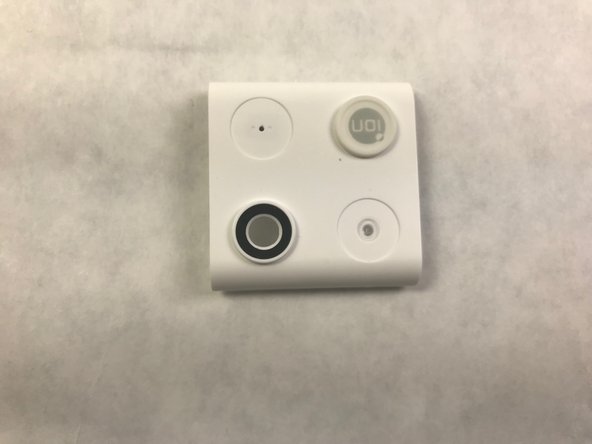
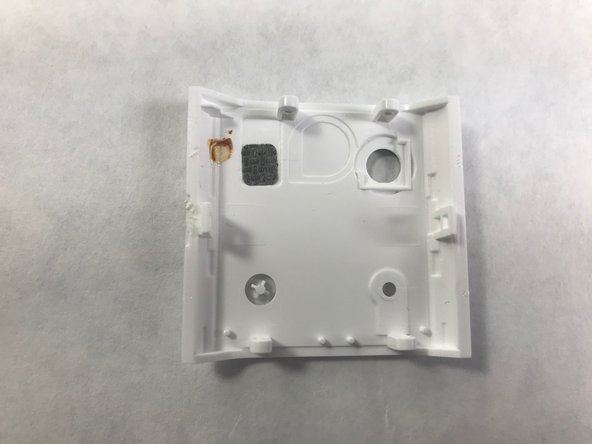
      • Locate the camera lens in the bottom left-hand corner of the picture which can be replaced by replacing the entire cover. The back of the cover is also shown. The camera is now located in the top right-hand corner of the picture.

      FixBotに聞いてみる

      コメントを追加

    1. iON SnapCam 1046 Lite Battery Replacement, Battery: 手順 5、 2の画像 1 iON SnapCam 1046 Lite Battery Replacement, Battery: 手順 5、 2の画像 2
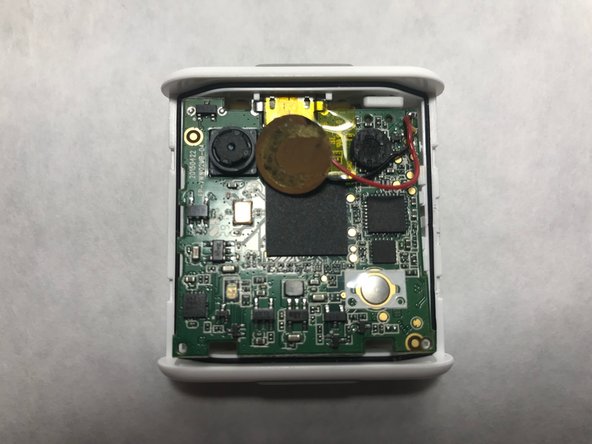
      • Use a nylon spudger to gently pry the four tabs holding the motherboard in place.

      FixBotに聞いてみる

      コメントを追加

    2. iON SnapCam 1046 Lite Battery Replacement: 手順 6、 2の画像 1 iON SnapCam 1046 Lite Battery Replacement: 手順 6、 2の画像 2
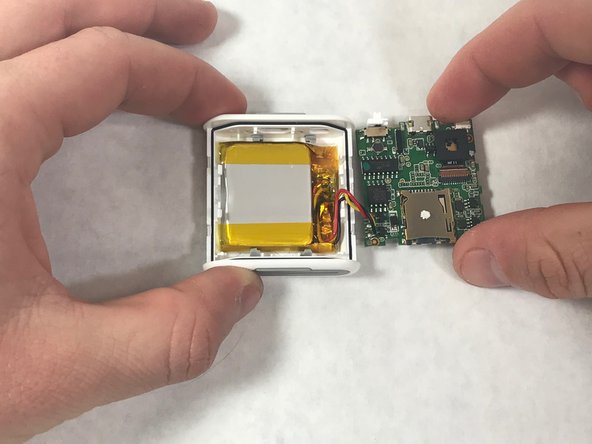
      • Lift the motherboard to reveal the battery compartment. Remove the thermal tape holding it in place and replace battery.

      • WARNING: Lithium Battery!

      FixBotに聞いてみる

      コメントを追加

終わりに

To reassemble your device, follow these instructions in reverse order.

キャンセル: このガイドを終了できませんでした。

作成者

4人の作成者と共同で作成されました。

Travis Leondis

メンバー登録日: 11/20/17

101 ポイント

1ガイドが承認済み

チーム

IUPUI, Team S22-G4, Bayer Fall 2017 IUPUI, Team S22-G4, Bayer Fall 2017人のメンバー

IUPUI-BAYER-F17S22G4

5 メンバー

4のガイドは作成済み

2件のガイドコメント

Can you please list the battery specifications for selecting the correct replacement battery?

Thank you for the posting and assistance.

james - 返信 共有

Where can I find a replacement battery?

Issis - 返信 共有

コメントを追加

統計データ:

過去 24時間: 0

過去 7 日: 6

過去 30 日: 24

今までの合計 901