はじめに
This guide shows you how to replace the backup battery on the TI-84 Plus Silver Edition. The backup battery is located on the back side of the calculator above the main batteries.
必要な工具と部品
-
-
-
Push firmly down on the tab located on the back of the calculator near the center.
-
Pull the tab up, lifting it off of the calculator and exposing the batteries.
 FixBotに聞いてみる
-
-
-
-
-
-
Using the Phillips #00 Screwdriver, unscrew the 15 mm screw holding the backup battery cover, located above the main battery area.
-
-
-
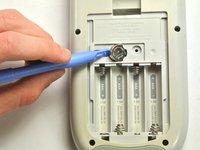
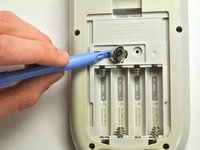
Wedge the small plastic opening tool under the backup battery in the gap to the left of the backup battery.
-
Push gently downward until the backup battery pops out.
-
-


To reassemble your device, follow these instructions in reverse order.
17 の人々がこのガイドを完成させました。

チーム

Cal Poly, Team 11-34, Amido Fall 2013 Cal Poly, Team 11-34, Amido Fall 2013人のメンバー
CPSU-AMIDO-F13S11G34
4 メンバー
20のガイドは作成済み
9件のガイドコメント
My son's TI 84 Plus C has a rechargeable battery with a little cord attached to it which is significantly different from the AAA's shown in this Guide!
annualgain - 返信 共有
Because it's a completely different calculator.
Ozan Munsuz - 返信 共有
Muy instructivo e ilustrativo que permite fácilmente la operación de cambio de bacteria.
Andres Guaty - 返信 共有
Do NOT replace the back up battery and the main batteries at the same time! If you do, you will lose all of the calculator’s memory.
Too late…….. I had about 13000 bytes of programs
