メインコンテンツにスキップ
リペアコミュニティに参加 - アカウントの作成

Sony Reader Touch Edition PRS-600 Motherboard Replacement

必要な工具と部品

  1. Sony Reader Touch Edition PRS-600 Motherboard Replacement, Back Panel: 手順 1、 1の画像 1
    • Using the Phillips head screwdriver PH000, remove the two 1.4 mm screws that are located on the backside of the device.

    FixBotに聞いてみる

    コメントを追加

  2. Sony Reader Touch Edition PRS-600 Motherboard Replacement: 手順 2、 1の画像 1
    • Slide the back cover off by pushing it to the left, away from the side that held the screws.

    • Remove the cover.

    FixBotに聞いてみる

    コメントを追加

  3. Sony Reader Touch Edition PRS-600 Motherboard Replacement: 手順 3、 1の画像 1
    • This is what the device should look like once the back cover panel has been removed.

    FixBotに聞いてみる

    コメントを追加

  4. Sony Reader Touch Edition PRS-600 Motherboard Replacement, Battery: 手順 4、 1の画像 1
    • Once the back cover has been removed locate the battery in the bottom right corner of the device.

    • Using the pointed end of the spudger, push out the white plug that is connected to the battery from its beige base.

    FixBotに聞いてみる

    コメントを追加

  5. Sony Reader Touch Edition PRS-600 Motherboard Replacement: 手順 5、 1の画像 1
    • Use the flat end of the spudger to pry the battery out of its holder. There may be glue holding it in place.

    FixBotに聞いてみる

    コメントを追加

  6. Sony Reader Touch Edition PRS-600 Motherboard Replacement, Inner Casing: 手順 6、 1の画像 1
    • Using a screwdriver remove the four 1.4 mm screws that are holding the black plastic casing in place.

    FixBotに聞いてみる

    コメントを追加

  7. Sony Reader Touch Edition PRS-600 Motherboard Replacement: 手順 7、 1の画像 1
    • Pry open the black casing to access the screw that is holding down the battery holder.

    • Remove the one 1.4 mm screw that is holding down the battery holder located under black casing.

    • Lift the black inner casing and the battery holder out of the device.

    • The battery holder and the black inner casing are connected by a thin strip of copper. There may be glue holding the black inner casing in place.

    FixBotに聞いてみる

    コメントを追加

  8. Sony Reader Touch Edition PRS-600 Motherboard Replacement, Motherboard: 手順 8、 1の画像 1
    • Using a Phillips head screwdriver, remove the one 1.4 mm screw holding in the motherboard.

    FixBotに聞いてみる

    コメントを追加

  9. Sony Reader Touch Edition PRS-600 Motherboard Replacement: 手順 9、 2の画像 1 Sony Reader Touch Edition PRS-600 Motherboard Replacement: 手順 9、 2の画像 2
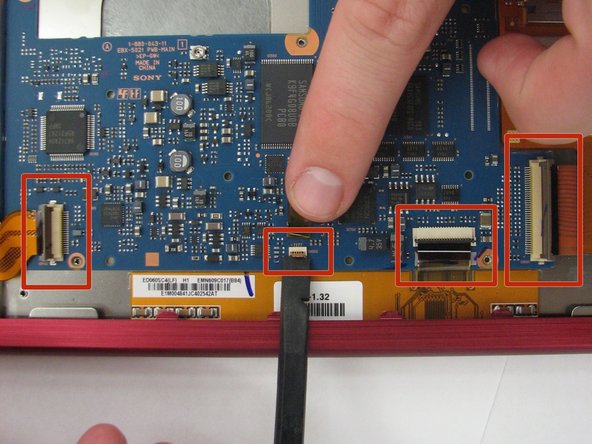
    • Using the flat end of the spudger, flip up the 4 latches holding down the thin, orange strips that connect the motherboard to the screen, audio/AC adapter/micro USB ports, and SD card/PRODuo ports.

    • To disconnect the the screen, audio/AC adapter/micro USB ports, and SD card/PRODuo ports pull each orange slip away from their corresponding latch.

    FixBotに聞いてみる

    コメントを追加

  10. Sony Reader Touch Edition PRS-600 Motherboard Replacement: 手順 10、 2の画像 1 Sony Reader Touch Edition PRS-600 Motherboard Replacement: 手順 10、 2の画像 2
    • Lift the end of the motherboard closest to the memory cards and pull out.

    FixBotに聞いてみる

    コメントを追加

終わりに

To reassemble your device, follow these instructions in reverse order.

キャンセル: このガイドを終了できませんでした。

作成者

3人の作成者と共同で作成されました。

Terrika Ngobili

メンバー登録日: 10/13/14

857 ポイント

7のガイドは作成済み

チーム

Clemson, Team 1-4, Benson Fall 2014 Clemson, Team 1-4, Benson Fall 2014人のメンバー

CLEM-BENSON-F14S1G4

4 メンバー

22のガイドは作成済み

0件のガイドコメント

コメントを追加

統計データ:

過去 24時間: 4

過去 7 日: 14

過去 30 日: 47

今までの合計 1,126