メインコンテンツにスキップ
リペアコミュニティに参加 - アカウントの作成

Samsung Ace Keyboard Replacement

閲覧: 1370

統計データ:

過去24時間:
0
過去7日:
5
過去30日:
48
今までの合計
1,370
コメント: 0

このガイドにコメントを投稿した人はいません。何かコメントはありませんか?(日本語可)

修理ガイドのコメントへ
完了済み: 1

1人のユーザーがこのガイドを使って修理を「完了」させました。あなたも加わりませんか?

お気に入り: 3

3人のユーザーがこのガイドをお気に入りに登録しています。あなたもリストに入れませんか?

所要時間: 20 - 30 分
難易度: 中レベル
Samsung Ace Keyboard Replacement

はじめに

手順 1 に進む ↓

If your keypad is malfunctioning by either inputting the wrong characters when you type or not recognizing when you click any of the buttons, then installing a new keypad may help.

必要な工具と部品

ツール

    1. Samsung Ace Keyboard Replacement, Battery: 手順 1、 3の画像 1 Samsung Ace Keyboard Replacement, Battery: 手順 1、 3の画像 2 Samsung Ace Keyboard Replacement, Battery: 手順 1、 3の画像 3
      • To remove the back casing, firmly press down and push towards the bottom of the phone.

      FixBotに聞いてみる

      コメントを追加

    2. Samsung Ace Keyboard Replacement: 手順 2、 1の画像 1
      • With the casing removed, lift the battery from the indicated indentation.

      FixBotに聞いてみる

      コメントを追加

    3. Samsung Ace Keyboard Replacement: 手順 3、 1の画像 1
      • From here, you can now access the SIM card and model/serial numbers.

      FixBotに聞いてみる

      コメントを追加

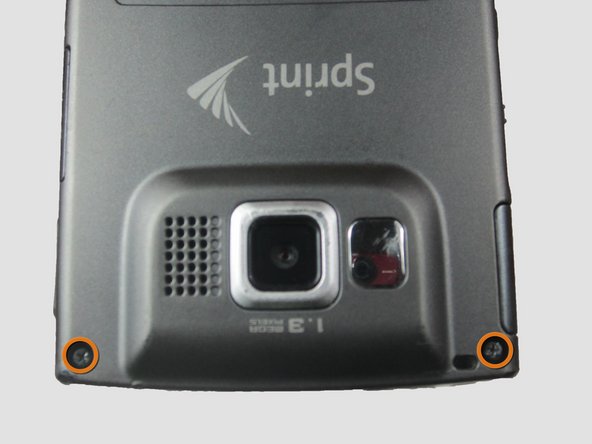
    1. Samsung Ace Keyboard Replacement, Casing: 手順 4、 1の画像 1
      • Using the Phillips #00 screwdriver, remove the four indicated screws (4.5 mm).

      FixBotに聞いてみる

      コメントを追加

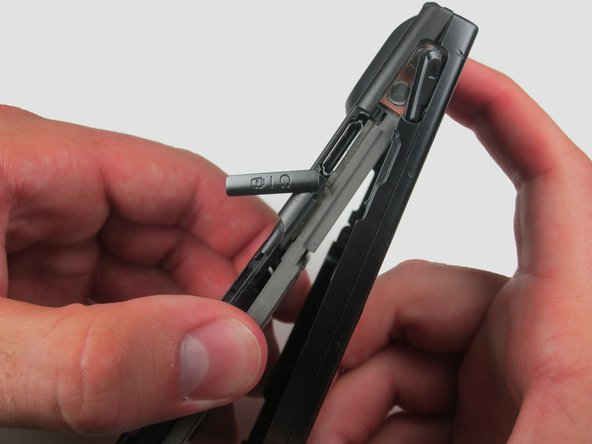
    2. Samsung Ace Keyboard Replacement: 手順 5、 2の画像 1 Samsung Ace Keyboard Replacement: 手順 5、 2の画像 2
      • Press the pointed edge of the spudger into the side of the two rubber plugs in order to lift and remove them from the top of the phone.

      • Then, using the Phillips #00 screwdriver, remove the two indicated Phillip screws (6.5 mm).

      FixBotに聞いてみる

      コメントを追加

    3. Samsung Ace Keyboard Replacement: 手順 6、 1の画像 1
      • To remove the SIM card, start by pressing the top of the card and push down and away towards the bottom of the phone. Then, as indicated, pull the SIM card out.

      FixBotに聞いてみる

      コメントを追加

    4. Samsung Ace Keyboard Replacement: 手順 7、 2の画像 1 Samsung Ace Keyboard Replacement: 手順 7、 2の画像 2
      • Begin to slowly lift the back casing of the phone. You should hear a snap when the casing is released.

      • The power, volume, and camera buttons may fall out when separating the front and back casing.

      FixBotに聞いてみる

      コメントを追加

    5. Samsung Ace Keyboard Replacement: 手順 8、 1の画像 1
      • Your casing should be separated and the three loose buttons put to the side.

      • Be aware of the wiring on the top of the phone. Make sure not to pull it apart when separating the case.

      FixBotに聞いてみる

      コメントを追加

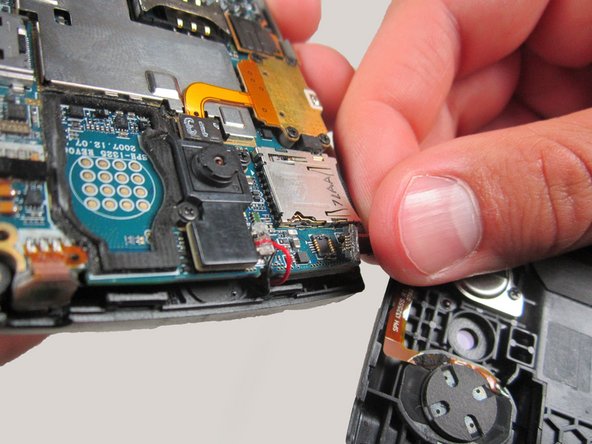
    6. Samsung Ace Keyboard Replacement: 手順 9、 2の画像 1 Samsung Ace Keyboard Replacement: 手順 9、 2の画像 2
      • Slowly remove the back casing by gently pulling the ribbon connection.

      FixBotに聞いてみる

      コメントを追加

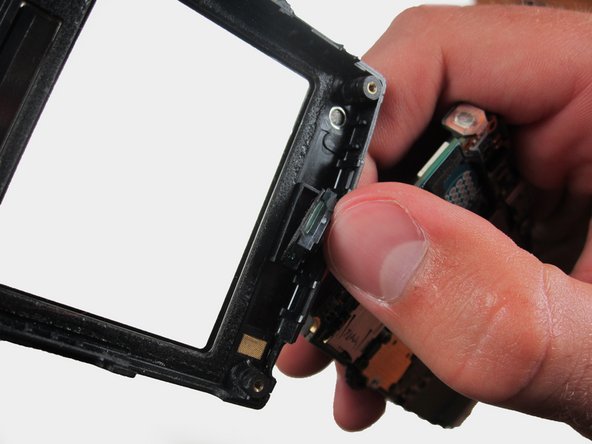
    7. Samsung Ace Keyboard Replacement: 手順 10、 2の画像 1 Samsung Ace Keyboard Replacement: 手順 10、 2の画像 2
      • Gently pull on the wires to remove the front casing.

      FixBotに聞いてみる

      コメントを追加

    8. Samsung Ace Keyboard Replacement: 手順 11、 1の画像 1
      • Your front casing and front speaker are now released.

      FixBotに聞いてみる

      コメントを追加

    1. Samsung Ace Keyboard Replacement, Keyboard: 手順 12、 1の画像 1
      • Remove the keypad and place it to the side.

      FixBotに聞いてみる

      コメントを追加

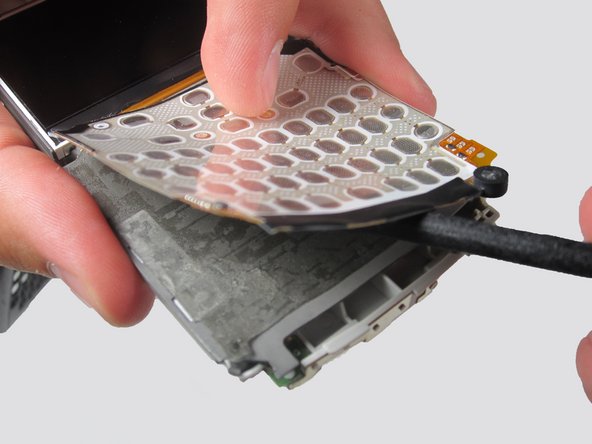
    2. Samsung Ace Keyboard Replacement: 手順 13、 2の画像 1 Samsung Ace Keyboard Replacement: 手順 13、 2の画像 2
      • Insert the flat edge of the spudger to the space under the keypad and slide it along the bottom to lift the keypad out of its place. The keypad should be stuck to the surface very tightly.

      FixBotに聞いてみる

      コメントを追加

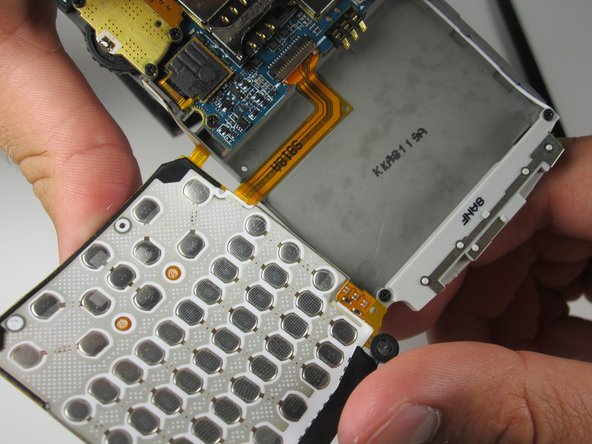
    3. Samsung Ace Keyboard Replacement: 手順 14、 2の画像 1 Samsung Ace Keyboard Replacement: 手順 14、 2の画像 2
      • The keypad will lift off the adhesive.

      • Be aware of the wires still connected on the right side of the phone.

      FixBotに聞いてみる

      コメントを追加

終わりに

To reassemble your device, follow these instructions in reverse order.

キャンセル: このガイドを終了できませんでした。

ある他の人がこのガイドを完成しました。

作成者

5人の作成者と共同で作成されました。

Garrett Germany

メンバー登録日: 04/15/12

24 ポイント

2のガイドは作成済み

チーム

Cal Poly, Team 6-24, Amido Spring 2012 Cal Poly, Team 6-24, Amido Spring 2012人のメンバー

CPSU-AMIDO-S12S6G24

3 メンバー

84のガイドは作成済み

0件のガイドコメント

コメントを追加

統計データ:

過去 24時間: 0

過去 7 日: 5

過去 30 日: 48

今までの合計 1,370