メインコンテンツにスキップ

Replacement of Hardware on a Crossbody bag

必要な工具と部品

  1. Replacement of Hardware on a Crossbody bag, Hardware on a Crossbody bag: 手順 1、 2の画像 1 Replacement of Hardware on a Crossbody bag, Hardware on a Crossbody bag: 手順 1、 2の画像 2
    • Remove the old stitching with the seam ripper blade.

    • Use the seam ripper blade carefully as it is very sharp.

  2. Replacement of Hardware on a Crossbody bag: 手順 2、 2の画像 1 Replacement of Hardware on a Crossbody bag: 手順 2、 2の画像 2
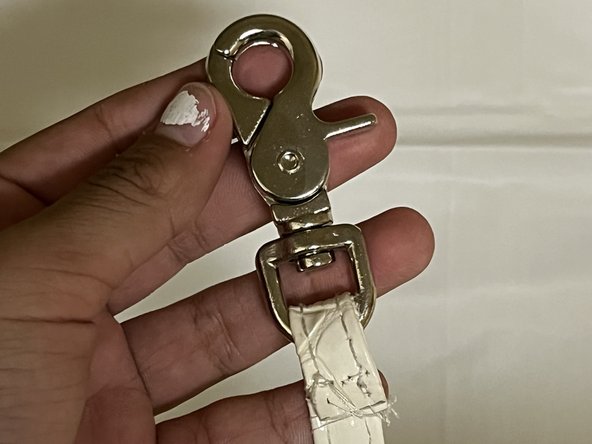
    • Remove the previous hardware from the strap.

  3. Replacement of Hardware on a Crossbody bag: 手順 3、 1の画像 1
    • Measure, and ensure the new hardware fits.

    • Place the new hardware through the strap.

  4. Replacement of Hardware on a Crossbody bag: 手順 4、 2の画像 1 Replacement of Hardware on a Crossbody bag: 手順 4、 2の画像 2
    • Use the needle and thread to stitch the new hardware into place.

    • Using the adequate needle for the material you need is essential, as some materials may be thicker and need a larger needle.

    • Use needle and thread carefully, as the needle can be sharp.

  5. Replacement of Hardware on a Crossbody bag: 手順 5、 1の画像 1
    • Verify the stitching is secure by hanging the crossbody bag.

ゴール

ある他の人がこのガイドを完成しました。

作成者

2人の作成者と共同で作成されました。

joanna

メンバー登録日: 02/20/24

122 ポイント

1ガイドが承認済み

チーム

University of Arizona, Team 3-9, Cools Stephens Spring 2024 University of Arizona, Team 3-9, Cools Stephens Spring 2024人のメンバー

ARIZONA-COOLS STEPHENS-S24S3G9

2 メンバー

1のガイドは作成済み

0件のガイドコメント

コメントを追加

統計データ:

過去 24時間: 0

過去 7 日: 1

過去 30 日: 11

今までの合計 237