メインコンテンツにスキップ

PDP Rematch Advanced Joystick Cover Replacement

必要な工具と部品

  1. PDP Rematch Advanced Joystick Cover Replacement, Joystick Cover: 手順 1、 3の画像 1 PDP Rematch Advanced Joystick Cover Replacement, Joystick Cover: 手順 1、 3の画像 2 PDP Rematch Advanced Joystick Cover Replacement, Joystick Cover: 手順 1、 3の画像 3
    • Orient the controller so the back side is facing you.

    • Use a Phillips #000 screwdriver to remove the seven 9 mm screws that secure the back shell.

  2. PDP Rematch Advanced Joystick Cover Replacement: 手順 2、 3の画像 1 PDP Rematch Advanced Joystick Cover Replacement: 手順 2、 3の画像 2 PDP Rematch Advanced Joystick Cover Replacement: 手順 2、 3の画像 3
    • Pull apart the controller's front and back shells with moderate force.

    • Orient the controller so that the front shell is facing the floor to prevent the face buttons from falling out.

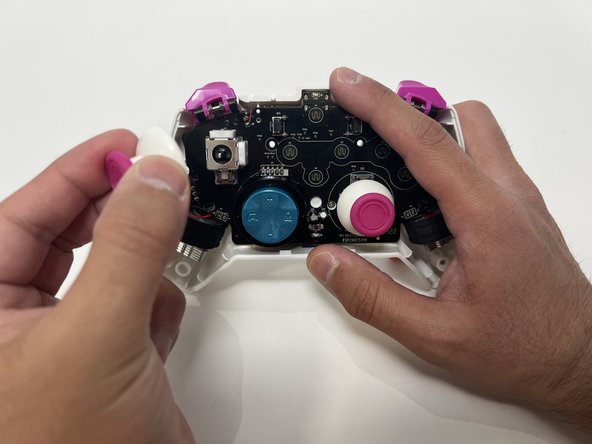
  3. PDP Rematch Advanced Joystick Cover Replacement: 手順 3、 2の画像 1 PDP Rematch Advanced Joystick Cover Replacement: 手順 3、 2の画像 2
    • Twist the thumbstick to remove it from the motherboard. Repeat this step if both thumbsticks need to be replaced.

終わりに

To reassemble your device, follow these instructions in reverse order.

2 の人々がこのガイドを完成させました。

作成者

3人の作成者と共同で作成されました。

Angel Velasquez

メンバー登録日: 01/30/24

360 ポイント

3のガイドは作成済み

チーム

Utah Tech University, Team 1-1, McMurrin Spring 2024 Utah Tech University, Team 1-1, McMurrin Spring 2024人のメンバー

UTAHTECH-MCMURRIN-S24S1G1

2 メンバー

7のガイドは作成済み

0件のガイドコメント

コメントを追加

統計データ:

過去 24時間: 4

過去 7 日: 17

過去 30 日: 69

今までの合計 1,370