メインコンテンツにスキップ
リペアコミュニティに参加 - アカウントの作成

OPPO N1 Screen Replacement

必要な工具と部品

  1. OPPO N1 Screen Replacement, Rear Case: 手順 1、 1の画像 1
    • Insert the plastic opening tool into the crevice. The back cover is most easily opened by starting at this location.

    FixBotに聞いてみる

    コメントを追加

  2. OPPO N1 Screen Replacement: 手順 2、 2の画像 1 OPPO N1 Screen Replacement: 手順 2、 2の画像 2
    • In the photo we rotated the phone ninety degrees counterclockwise.

    • Gently slide the plastic opening tool around the edge of the phone to release the back cover from the phone. You may hear some snapping noises as you release the back cover.

    • The rear case should then come free.

    FixBotに聞いてみる

    コメントを追加

  3. OPPO N1 Screen Replacement, Battery: 手順 3、 2の画像 1 OPPO N1 Screen Replacement, Battery: 手順 3、 2の画像 2
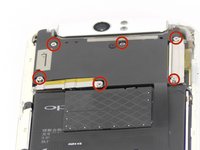
    • Remove the six 4mm long screws holding the motherboard in with the ph0 Phillips head screw driver.

    FixBotに聞いてみる

    コメントを追加

  4. OPPO N1 Screen Replacement: 手順 4、 1の画像 1
    この手順で使用する道具:
    Tweezers
    $4.99
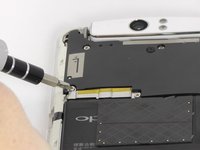
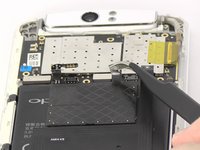
    • Use the tweezers or your fingers to remove the sliver plates.

    FixBotに聞いてみる

    コメントを追加

  5. OPPO N1 Screen Replacement: 手順 5、 1の画像 1
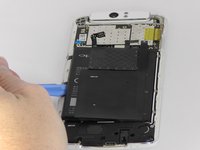
    • Remove the black plate with your fingers.

    FixBotに聞いてみる

    コメントを追加

  6. OPPO N1 Screen Replacement: 手順 6、 3の画像 1 OPPO N1 Screen Replacement: 手順 6、 3の画像 2 OPPO N1 Screen Replacement: 手順 6、 3の画像 3
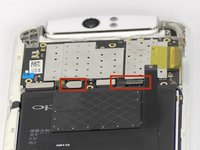
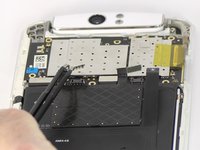
    • Use tweezers or your fingers to pull up the connector tabs.

    FixBotに聞いてみる

    コメントを追加

  7. OPPO N1 Screen Replacement: 手順 7、 2の画像 1 OPPO N1 Screen Replacement: 手順 7、 2の画像 2
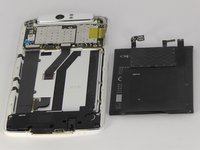
    • Use the blue opening tool to carefully pry the battery from the sticky tape that attaches it to the device.

    FixBotに聞いてみる

    コメントを追加

  8. OPPO N1 Screen Replacement, Motherboard: 手順 8、 1の画像 1
    この手順で使用する道具:
    Tweezers
    $4.99
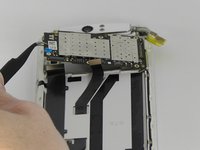
    • Use tweezers or fingers to remove the three connector tabs.

    FixBotに聞いてみる

    コメントを追加

  9. OPPO N1 Screen Replacement: 手順 9、 2の画像 1 OPPO N1 Screen Replacement: 手順 9、 2の画像 2
    • Use tweezers or your fingers to remove the motherboard.

    FixBotに聞いてみる

    コメントを追加

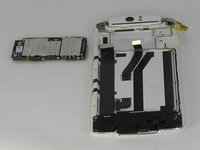
  10. OPPO N1 Screen Replacement, Headphone Jack and Speaker Cover: 手順 10、 1の画像 1
    • Remove the two 4mm long screws using the ph0 Phillips head screw driver.

    • Remove the six 3mm long screws using the ph0 Phillips head screw driver.

    FixBotに聞いてみる

    コメントを追加

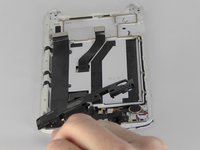
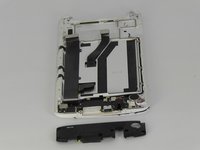
  11. OPPO N1 Screen Replacement: 手順 11、 2の画像 1 OPPO N1 Screen Replacement: 手順 11、 2の画像 2
    この手順で使用する道具:
    Tweezers
    $4.99
    • Use tweezers or your fingers to remove the plastic cover.

    FixBotに聞いてみる

    コメントを追加

  12. OPPO N1 Screen Replacement, Screen: 手順 12、 1の画像 1
    この手順で使用する道具:
    Tweezers
    $4.99
    • Use tweezers to disconnect the connector tab.

    FixBotに聞いてみる

    コメントを追加

  13. OPPO N1 Screen Replacement: 手順 13、 1の画像 1
    • Use tweezers to peel the black strip from the sticky tape attached to the phone so that the black strip will slide through the phone once the screen is removed.

    • Be gentle removing the black strip at this stage. It can easily tear and it must be removed in order to remove the screen.

    FixBotに聞いてみる

    コメントを追加

  14. OPPO N1 Screen Replacement: 手順 14、 3の画像 1 OPPO N1 Screen Replacement: 手順 14、 3の画像 2 OPPO N1 Screen Replacement: 手順 14、 3の画像 3
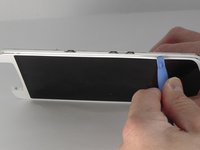
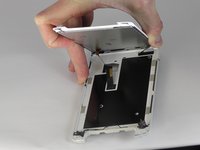
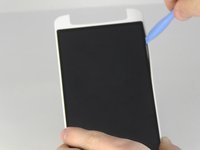
    • Insert the blue opening tool into the crevice between the screen and the main body of the phone. Gently slide the tool around the edge of the phone.

    FixBotに聞いてみる

    コメントを追加

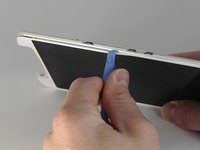
  15. OPPO N1 Screen Replacement: 手順 15、 2の画像 1 OPPO N1 Screen Replacement: 手順 15、 2の画像 2
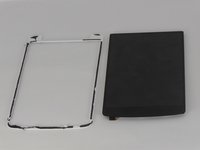
    • Insert the blue opening tool in between the black screen and the white border and slide it around the edge of the black screen.

    FixBotに聞いてみる

    コメントを追加

終わりに

To reassemble your device, follow these instructions in reverse order.

キャンセル: このガイドを終了できませんでした。

10 の人々がこのガイドを完成させました。

作成者

4人の作成者と共同で作成されました。

Joshua Stone

メンバー登録日: 09/26/14

1,067 ポイント

5のガイドは作成済み

チーム

USF Tampa, Team 13-5, Staggers Fall 2014 USF Tampa, Team 13-5, Staggers Fall 2014人のメンバー

USFT-STAGGERS-F14S13G5

3 メンバー

8のガイドは作成済み

0件のガイドコメント

コメントを追加

統計データ:

過去 24時間: 2

過去 7 日: 10

過去 30 日: 45

今までの合計 5,916