メインコンテンツにスキップ
リペアコミュニティに参加 - アカウントの作成

Nokia 5310b XpressMusic Keypad Replacement

必要な工具と部品

  1. Nokia 5310b XpressMusic Keypad Replacement, Battery: 手順 1、 1の画像 1
    • Slide the black battery cover down and off the phone with your thumb to remove it.

    • The battery cover is not shown in this picture

  2. Nokia 5310b XpressMusic Keypad Replacement: 手順 2、 2の画像 1 Nokia 5310b XpressMusic Keypad Replacement: 手順 2、 2の画像 2
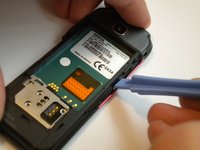
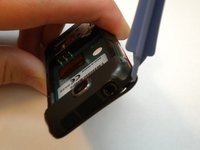
    • Gently lift the battery with a fingernail to remove it from the back of the phone.

    • Keep the battery removed for the next steps

    • The battery may be replaced or repaired at this step.

  3. Nokia 5310b XpressMusic Keypad Replacement, Keypad: 手順 3、 3の画像 1 Nokia 5310b XpressMusic Keypad Replacement, Keypad: 手順 3、 3の画像 2 Nokia 5310b XpressMusic Keypad Replacement, Keypad: 手順 3、 3の画像 3
    • On some models, the front case is screwed down from the back. Follow steps 5 and 6 first to remove the camera cover and two T6 screws, BEFORE removing the faceplate.

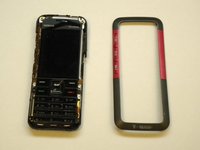
    • Find a small latch under the music keys and in the middle of each side of the faceplate.

    • Gently lift the edges of the front faceplate off the phone using a spudger.

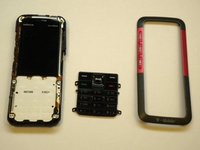
  4. Nokia 5310b XpressMusic Keypad Replacement: 手順 4、 2の画像 1 Nokia 5310b XpressMusic Keypad Replacement: 手順 4、 2の画像 2
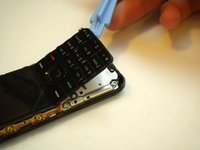
    • Flip the phone over to the front side.

    • Lift up the keypad from the bottom with either a spudger or your finger.

    • At this time the keypad can be removed and replaced.

終わりに

To reassemble your device, follow these instructions in reverse order.

5 の人々がこのガイドを完成させました。

作成者

5人の作成者と共同で作成されました。

Max Kirby

メンバー登録日: 05/01/11

518 ポイント

4のガイドは作成済み

チーム

Cal Poly, Team 15-14, Regan Spring 2011 Cal Poly, Team 15-14, Regan Spring 2011人のメンバー

CPSU-REGAN-S11S15G14

3 メンバー

8のガイドは作成済み

0件のガイドコメント

コメントを追加

統計データ:

過去 24時間: 2

過去 7 日: 15

過去 30 日: 58

今までの合計 6,389