メインコンテンツにスキップ

New Nintendo 3DS XL 2015 A,B,X,Y, Start or Select Button Replacement

必要な工具と部品

  1. New Nintendo 3DS XL 2015 A,B,X,Y, Start or Select Button Replacement, Battery: 手順 1、 1の画像 1
    • Ensure your device is powered off before proceeding. Failure to do so may result in electrical shock or damage to the device.

    • Place the 3DS upside down. Remove the game card, headphones, charging cable, stylus, or anything else that may be connected to the device.

  2. New Nintendo 3DS XL 2015 A,B,X,Y, Start or Select Button Replacement: 手順 2、 1の画像 1
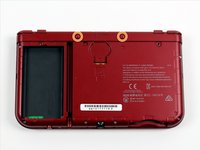
    • Using a JIS #0 screwdriver, loosen the two black screws on the back.

    • The screws are held in place by captive washers and should not be completely removed.

  3. New Nintendo 3DS XL 2015 A,B,X,Y, Start or Select Button Replacement: 手順 3、 1の画像 1
    • Once the screws are loosened, pry open the back cover.

  4. New Nintendo 3DS XL 2015 A,B,X,Y, Start or Select Button Replacement: 手順 4、 1の画像 1
    • The battery is located on the left hand side of the 3DS - to remove, use the small gap located at the top-middle and pull up with a non metal pointed tool.

    • Remove the SD card by pressing it in with your thumbnail until it clicks and partially ejects, then pull it out.

  5. New Nintendo 3DS XL 2015 A,B,X,Y, Start or Select Button Replacement, A,B,X,Y, Start or Select Button: 手順 5、 1の画像 1
    • Remove the six 6mm screws on the secondary panel using a JIS #000 screwdriver.

  6. New Nintendo 3DS XL 2015 A,B,X,Y, Start or Select Button Replacement: 手順 6、 2の画像 1 New Nintendo 3DS XL 2015 A,B,X,Y, Start or Select Button Replacement: 手順 6、 2の画像 2
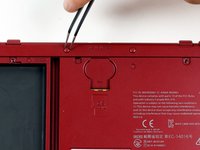
    • Remove two upper rubber bumpers locates on either side of the charging port.

    • Using JIS #00 screwdriver, carefully remove the two 6mm screws that have now been exposed.

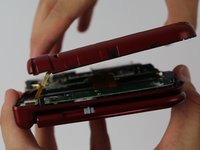
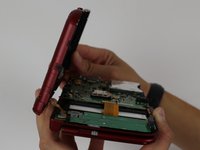
  7. New Nintendo 3DS XL 2015 A,B,X,Y, Start or Select Button Replacement: 手順 7、 3の画像 1 New Nintendo 3DS XL 2015 A,B,X,Y, Start or Select Button Replacement: 手順 7、 3の画像 2 New Nintendo 3DS XL 2015 A,B,X,Y, Start or Select Button Replacement: 手順 7、 3の画像 3
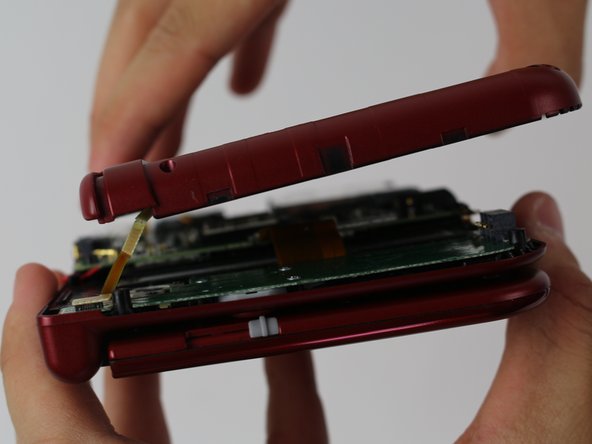
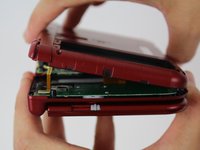
    • To pry off the cover, carefully lift it up and away from the hinges (in order to clear the headphone port), then pivot it towards the hinges to expose the circuit boards.

  8. New Nintendo 3DS XL 2015 A,B,X,Y, Start or Select Button Replacement: 手順 8、 1の画像 1
    この手順で使用する道具:
    Tweezers
    $4.99
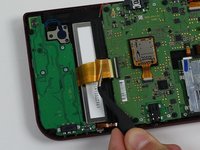
    • Use non-conductive tweezers to disconnect the two ribbon plugs that connect the L/R/ZL/ZR buttons on the cover to the motherboard, then remove it completely. Or, use the flat end of a spudger to pop them off.

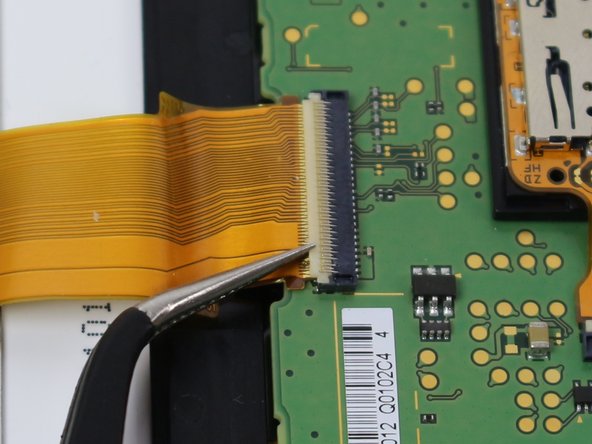
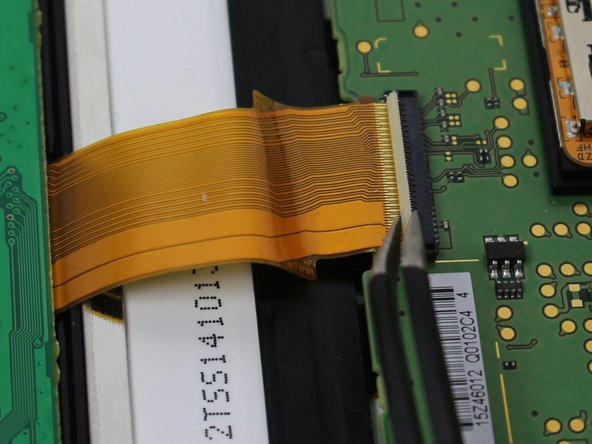
  9. New Nintendo 3DS XL 2015 A,B,X,Y, Start or Select Button Replacement: 手順 9、 3の画像 1 New Nintendo 3DS XL 2015 A,B,X,Y, Start or Select Button Replacement: 手順 9、 3の画像 2 New Nintendo 3DS XL 2015 A,B,X,Y, Start or Select Button Replacement: 手順 9、 3の画像 3
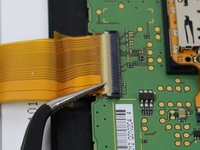
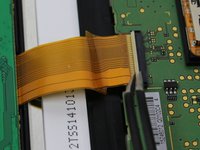
    • Locate the ribbon connector between the motherboard and the left circuit board (it should be the widest) and use a pair of tweezers or the flat end of a spudger to pivot up the ZIF clasp upward.

    • The ribbon can be removed using non-conductive tweezers by pulling out parallel with the board.

  10. New Nintendo 3DS XL 2015 A,B,X,Y, Start or Select Button Replacement: 手順 10、 1の画像 1
    • Next, locate the five 3mm screws on the left board and remove them using a JIS #000 screwdriver.

  11. New Nintendo 3DS XL 2015 A,B,X,Y, Start or Select Button Replacement: 手順 11、 1の画像 1
    • Carefully flip the board over and use tweezers to remove the blue-black ribbon located underneath.

    • If your ABXY buttons aren't working, you can peel off the clear sticker with the metal contacts to clean off the corrosion that may build up underneath, as shown in this video.

    • Use a sharp object such as an X-ACTO knife to scrape off the corrosion, as shown; a similar procedure can be followed for a malfunctioning directional pad. The device can then be reassembled, following these steps in reverse order.

  12. New Nintendo 3DS XL 2015 A,B,X,Y, Start or Select Button Replacement: 手順 12、 1の画像 1
    • Remove the gray rubber diamond to reveal the A/B/X/Y buttons and/or the rubber rectangle to reveal the Start/Select button.

    • Remove the buttons using tweezers.

    • When replacing, be sure to check that each button is placed back and is snugly fit into the appropriate hole before reassembling the device.

終わりに

To reassemble your device, follow these instructions in reverse order.

29 の人々がこのガイドを完成させました。

作成者

7人の作成者と共同で作成されました。

Kobbe Farwick

メンバー登録日: 04/01/15

2,599 ポイント

2のガイドは作成済み

チーム

Cal Poly, Team 24-4, Lancaster Spring 2015 Cal Poly, Team 24-4, Lancaster Spring 2015人のメンバー

CPSU-LANCASTER-S15S24G4

4 メンバー

32のガイドは作成済み

16件のガイドコメント

do the smaller new 3ds colored buttons work in the new 3ds xl?

itsandy14 - 返信

It will work, since the only difference between them is the size of screen and shell, but size of buttons and other pieces should be of the same.

CheatJoker -

If anyone else comes on this, I can confirm the small 3ds buttons do not quite work right they are slightly smaller and the cut outs that keep the buttons from spinning around are not the same

Demon09 -

Can someone provide further information about replacement of the entire C stick?

Or is it just as simple as pull the ribbon carefully, take the old one out and put the new one in?

CheatJoker - 返信

There are two parts. The rubber bit, and the joystick assembly. The stick assembly is connected by 3 short screws, and inserted into the joystick board via zif connector. You need to unscrew the assembly to access the rubber bit.

Mogamad Lilla -

コメントを追加

統計データ:

過去 24時間: 24

過去 7 日: 253

過去 30 日: 1,100

今までの合計 60,576