この翻訳は機械によって生成されたものであり、まだ人間による校正は行われていません。 日本語を話せますか? レビューはこちらから。

Magic Trackpadのゴム足の交換/再挿入

閲覧: 12万
統計データ:
- 過去24時間:
- 7
- 過去7日:
- 60
- 過去30日:
- 334
- 今までの合計
- 115,029
コメント: 95
手順に関する28件のコメント, 67件のガイドコメント
修理ガイドのコメントへ完了済み: 179 180
179人のユーザーがこのガイドを「完了」させました。あなたも加わりませんか?
あなたを含む、180人のユーザーがこのガイドを使って修理を「完了」させました。素晴らしいです!
お気に入り: 23 24
23人のユーザーがこのガイドをお気に入りに登録しています。あなたもリストに入れませんか?
あなたを含む、24人のユーザーがこのガイドをお気に入りに登録しています。
コミュニティメンバーによる寄稿ガイド
iFixitコミュニティーの素晴らしいメンバーがこのガイドを作成しました。iFixitスタッフによって作成されたものではありません。
はじめに
手順 1 に進む ↓Magic Trackpadの「魔法」は、可動部品がないように見えながら物理的にクリックできる点にあります。
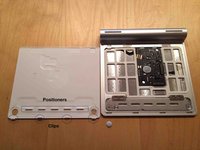
Magic Trackpadのクリックの秘密は、底面にある一見何の変哲もない丸いゴム足に隠されています。これは単にデスクの上で滑らないようにするための普通のゴム足ではありません。また、完全にゴムでできているわけでもありません。底面から突き出しているゴムは、硬いプラスチック製の足を覆う非常に薄く繊細なカバーに過ぎません。
この足には剛性が必要です。表面を押し込んでクリックする際、このゴムとプラスチックの足だけが「動かない」パーツとなります。
この修理ガイドでは、Magic Trackpadのゴム足を1つ(または両方)再挿入する方法を説明します。
必要な工具と部品
ツール

-
-
-
-
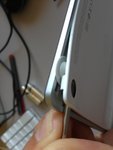
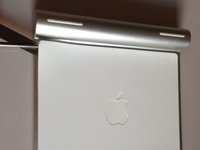
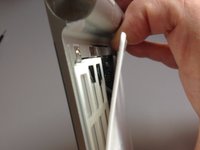
スパッジャーまたは小型のマイナスドライバーを使用して、失われた足の開口部付近にある白いプラスチック製の裏側と金属製の天板との間のシールを慎重に破ります。
-
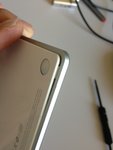
足を取り付けられるように、角を少し上にこじ開けます。
-
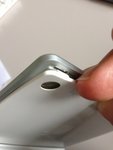
ゴム足を元の位置に戻します。
-
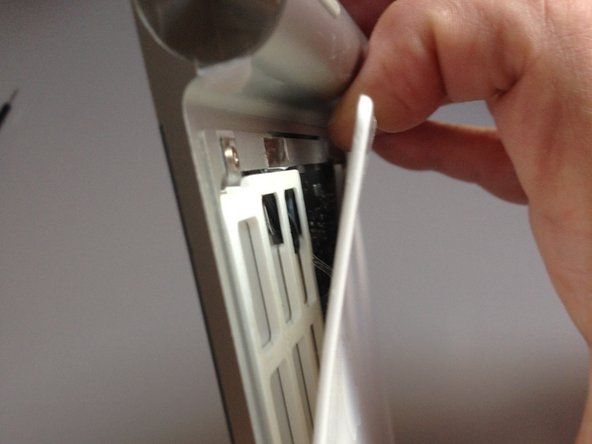
裏側と金属製の天板を閉じるように押さえます(カチッと音がして定位置にはまります)。
-
トラックパッドをクリックして動作を確認します。
-
バッテリーを挿入し、バッテリーカバーをネジで閉めます。
-


 FixBotに聞いてみる




179 の人々がこのガイドを完成させました。

67件のガイドコメント
where can i buy the plastic feet?????
Yes. Where can I buy the rubber feet?
I bought mine off Ali Express. There’s quite a few stores on there that sell them. Here’s the one I bought from.
James Sanday - 返信 共有
Found this guide confusing. Here's what worked for me:
1. Place the tip of a butter knife inside the hole and gently lift the plastic high enough to place the tip of another butter knife on the side and hold the plastic up.
2. Remove the first butter knife from the hole. Gently raise the plastic with the second butter knife high enough to slide the foot underneath.
3. Use the first butter knife to slide/rotate the foot into place
The butter knife technique worked for me! I just cracked open the bottom edge of where my little rubber foot had fallen out. (Somehow the plastic was still in there so I was able to stick the foot back in and it works!)
