メインコンテンツにスキップ
リペアコミュニティに参加 - アカウントの作成

Lenovo ThinkPad T500 Screen Replacement

必要な工具と部品

  1. Lenovo ThinkPad T500 Screen Replacement, Screen: 手順 1、 1の画像 1
    • Remove the eight 14mm screws using the Phillips #0 Screwdriver.

    FixBotに聞いてみる

    コメントを追加

  2. Lenovo ThinkPad T500 Screen Replacement: 手順 2、 1の画像 1
    • Lift the palm rest panel up.

    • Be sure to lift the panel slowly; there is a ribbon cable attached to the bottom.

    FixBotに聞いてみる

    コメントを追加

  3. Lenovo ThinkPad T500 Screen Replacement: 手順 3、 1の画像 1
    • Use the spudger to disconnect the ribbon cable.

    FixBotに聞いてみる

    コメントを追加

  4. Lenovo ThinkPad T500 Screen Replacement: 手順 4、 1の画像 1
    • With the panel disconnected, lift the keyboard.

    • As with the panel, lift the keyboard slowly; there is a ribbon cable attached to the bottom.

    FixBotに聞いてみる

    コメントを追加

  5. Lenovo ThinkPad T500 Screen Replacement: 手順 5、 1の画像 1
    • Disconnect the ribbon cable with the spudger.

    FixBotに聞いてみる

    コメントを追加

  6. Lenovo ThinkPad T500 Screen Replacement: 手順 6、 2の画像 1 Lenovo ThinkPad T500 Screen Replacement: 手順 6、 2の画像 2
    • Remove the keyboard and the panel.

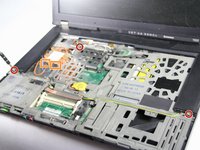
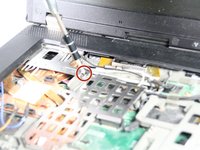
    • Using the Phillips #0 Screwdriver, remove the three 3 mm screws that are at the bottom sides and near the top-left of the speaker cover.

    • Disconnect the orange and blue cables next to the left side of the speaker cover.

    FixBotに聞いてみる

    コメントを追加

  7. Lenovo ThinkPad T500 Screen Replacement: 手順 7、 1の画像 1
    • Remove the speaker cover.

    FixBotに聞いてみる

    コメントを追加

  8. Lenovo ThinkPad T500 Screen Replacement: 手順 8、 1の画像 1
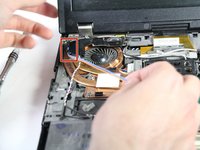
    • Remove the two 3mm screws on the left speaker with the Phillips #0 Screwdriver.

    FixBotに聞いてみる

    コメントを追加

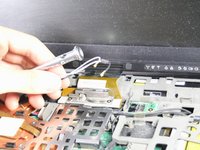
  9. Lenovo ThinkPad T500 Screen Replacement: 手順 9、 2の画像 1 Lenovo ThinkPad T500 Screen Replacement: 手順 9、 2の画像 2
    • Detach the blue and orange cables from the left speaker's clamps.

    FixBotに聞いてみる

    コメントを追加

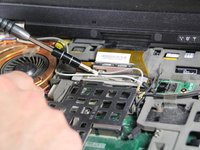
  10. Lenovo ThinkPad T500 Screen Replacement: 手順 10、 2の画像 1 Lenovo ThinkPad T500 Screen Replacement: 手順 10、 2の画像 2
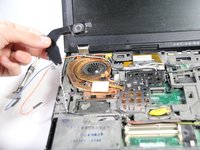
    • Using the Phillips #0 Screwdriver, lift the metal fastener up and remove the black and white wires.

    FixBotに聞いてみる

    コメントを追加

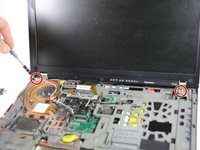
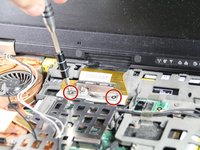
  11. Lenovo ThinkPad T500 Screen Replacement: 手順 11、 2の画像 1 Lenovo ThinkPad T500 Screen Replacement: 手順 11、 2の画像 2
    • Remove the two 3mm screws next to the lid hinges, as well as the two 3mm screws on the lid's ribbon cable.

    FixBotに聞いてみる

    コメントを追加

  12. Lenovo ThinkPad T500 Screen Replacement: 手順 12、 1の画像 1
    • Use the spudger to detach the screen's ribbon cable.

    FixBotに聞いてみる

    コメントを追加

  13. Lenovo ThinkPad T500 Screen Replacement: 手順 13、 1の画像 1
    • Remove the screen.

    FixBotに聞いてみる

    コメントを追加

終わりに

To reassemble your device, follow these instructions in reverse order.

キャンセル: このガイドを終了できませんでした。

7 の人々がこのガイドを完成させました。

作成者

4人の作成者と共同で作成されました。

nicO

メンバー登録日: 04/14/15

15,990 ポイント

89のガイドは作成済み

1件のガイドコメント

It was of good help, but be aware that you need to remove two screws on the back before removing the speaker cover. If not you will break the cover.

Bjørnar Valand - 返信 共有

コメントを追加

統計データ:

過去 24時間: 1

過去 7 日: 13

過去 30 日: 55

今までの合計 5,596