メインコンテンツにスキップ
リペアコミュニティに参加 - アカウントの作成

Leica Z2X Lens Cover Replacement

必要な工具と部品

    1. Leica Z2X Lens Cover Replacement, Remove the Bottom Screws: 手順 1、 1の画像 1
      • Carefully unscrew the four Phillips #0 screws on the bottom of the camera.

      • There is a screw located inside of the tripod hole (large circle.) Make sure the screw is removed from there too!

      FixBotに聞いてみる

      コメントを追加

    2. Leica Z2X Lens Cover Replacement, Open the Back Door: 手順 2、 1の画像 1
      • Open the back door on the camera by pushing down on the door latch.

      FixBotに聞いてみる

      コメントを追加

    3. Leica Z2X Lens Cover Replacement, Remove the Bottom Plate: 手順 3、 1の画像 1
      • Apply pressure to the bottom plate and it will pop off.

      • From here, you can replace the bottom plate, or continue on to further steps.

      FixBotに聞いてみる

      コメントを追加

    1. Leica Z2X Lens Cover Replacement, Lens Motor: 手順 4、 1の画像 1
      • Remove the five screws marked in the picture.

      FixBotに聞いてみる

      コメントを追加

    2. Leica Z2X Lens Cover Replacement: 手順 5、 1の画像 1
      • Apply pressure until the piece you unscrewed in the last step pops off.

      FixBotに聞いてみる

      コメントを追加

    3. Leica Z2X Lens Cover Replacement: 手順 6、 1の画像 1
      • Unscrew the four screws on the back of this piece to the lower-left corner of the lens.

      FixBotに聞いてみる

      コメントを追加

    4. Leica Z2X Lens Cover Replacement: 手順 7、 1の画像 1
      • Removing the lens motor cover, you should be left with these four pieces.

      FixBotに聞いてみる

      コメントを追加

    5. Leica Z2X Lens Cover Replacement: 手順 8、 1の画像 1
      • Located underneath these four pieces is the lens motor.

      FixBotに聞いてみる

      コメントを追加

    6. Leica Z2X Lens Cover Replacement: 手順 9、 1の画像 1
      • Now that you've removed the bottom plate, you can pull apart the front and back covers.

      • Start with the front cover and, by applying pressure (perhaps a lot of pressure), snap off the front cover.

      FixBotに聞いてみる

      コメントを追加

    7. Leica Z2X Lens Cover Replacement: 手順 10、 1の画像 1
      • Next, the back cover.

      • Apply pressure to remove the back plate.

      • Potential for device damage: Be careful of the buttons on the top of the camera falling off, they are small parts and CAN get lost easily.

      • The best way to remove the back is to stick your thumbs on either side of the battery socket and separate from there.

      FixBotに聞いてみる

      コメントを追加

    8. Leica Z2X Lens Cover Replacement: 手順 11、 1の画像 1
      • You should now have removed the front and back plates.

      FixBotに聞いてみる

      コメントを追加

    9. Leica Z2X Lens Cover Replacement: 手順 12、 1の画像 1
      • Remove the four screws holding on the front panel surrounding the lens.

      FixBotに聞いてみる

      コメントを追加

    10. Leica Z2X Lens Cover Replacement: 手順 13、 1の画像 1
      • Remove the three gears under the panel you removed in the last step and the lens motor should be able to be removed.

      FixBotに聞いてみる

      コメントを追加

    1. Leica Z2X Lens Cover Replacement, Lens Cover: 手順 14、 1の画像 1
      • Now that the lens motor has been removed, you can apply pressure to the back of the lens and push it out.

      • From here, locate the three screws near the front of the lens.

      • Unscrew these three screws.

      FixBotに聞いてみる

      コメントを追加

    2. Leica Z2X Lens Cover Replacement: 手順 15、 1の画像 1
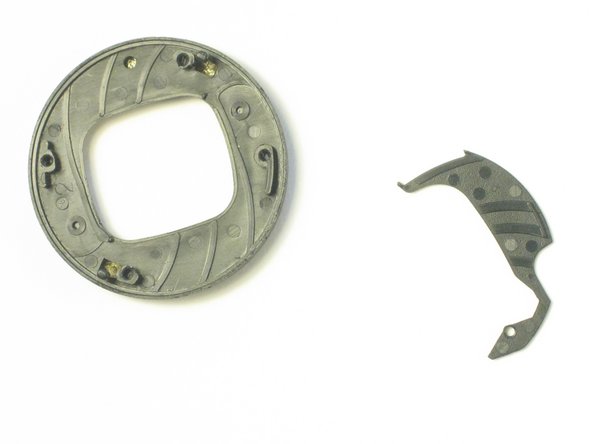
      • From here, you can pull out the small disk containing the lens cover.

      • Unscrew the four screws on the back and pull the two pieces of the disk apart.

      FixBotに聞いてみる

      コメントを追加

    3. Leica Z2X Lens Cover Replacement: 手順 16、 1の画像 1
      • From here, you can replace any broken parts in the lens cover.

      FixBotに聞いてみる

      コメントを追加

終わりに

To reassemble your device, follow these instructions in reverse order.

キャンセル: このガイドを終了できませんでした。

ある他の人がこのガイドを完成しました。

作成者

3人の作成者と共同で作成されました。

Kenny

メンバー登録日: 04/10/11

57 ポイント

3のガイドは作成済み

チーム

Cal Poly, Team 18-19, Garner Spring 2011 Cal Poly, Team 18-19, Garner Spring 2011人のメンバー

CPSU-GARNER-S11S18G19

4 メンバー

18のガイドは作成済み

0件のガイドコメント

コメントを追加

統計データ:

過去 24時間: 0

過去 7 日: 11

過去 30 日: 45

今までの合計 3,908