はじめに
Your phone uses a spring to help make the keypad slide in and out seamlessly. It is located between the front and back case. In this guide you will learn how to separate the front case from the sliding portion
必要な工具と部品
-
-
On the back of the phone, place your thumb on the three raised bumps and slide the back cover upward.
 FixBotに聞いてみる
-
-
この手順で使用する道具:Tweezers$4.99
-
Remove the two screw covers at the top of phone with tweezers.
-
-
-
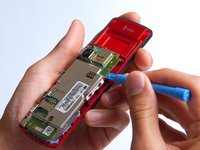
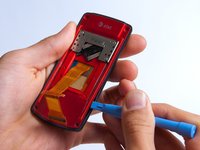
Use the plastic opening tool to pry the back cover off. Insert the tool between the back cover and red mid section and go around the entire phone.
-
-
-
-
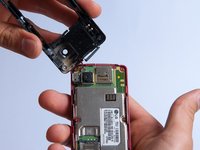
Use the tweezers to remove the red and black wires connecting the speaker to the green motherboard by pinching the sides of the plastic base near the motherboard.
-
Set the back cover with the speaker aside.
-
-
-
Use the plastic opening tool to gently lift the snapped-in motherboard from the front panel.
-
-
-
With the plastic opening tool, gently pry the LCD connector from the motherboard.
-
Set the motherboard aside.
-
-
-
Take the front case and unscrew the four Phillips #000 (1mm) screws around the ribbon.
-
-
-
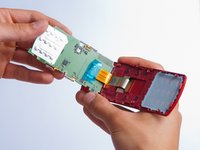
Gently pull the orange ribbon from the number pad casing.
-
Set the number pad case to the side once it is detached from the ribbon.
-
-
この手順で使用する道具:Tweezers$4.99
-
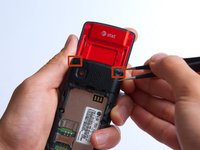
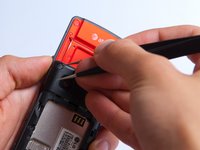
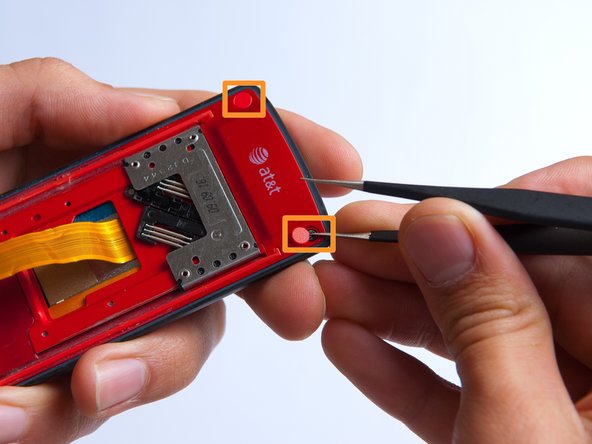
Remove the two red sticker screw coverings at the top corners with tweezers.
-
-
-
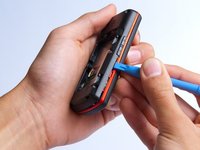
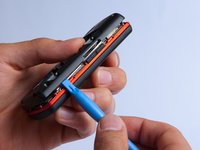
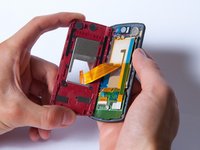
Pry the red sliding backing from the front cover by inserting the plastic opening tool in between the two sections and going around the entire phone.
-
Set the red sliding backing and front cover to the side.
-










To reassemble your device, follow these instructions in reverse order.
ある他の人がこのガイドを完成しました。

チーム

Cal Poly, Team 4-27, Amido Fall 2013 Cal Poly, Team 4-27, Amido Fall 2013人のメンバー
CPSU-AMIDO-F13S4G27
4 メンバー
35のガイドは作成済み
