メインコンテンツにスキップ

How to fix Logitech M171 Mouse Laser

  1. How to fix Logitech M171 Mouse Laser, Remove the plastic cover: 手順 1、 1の画像 1
    • Remove the plastic cover at the bottom of the mouse

  2. How to fix Logitech M171 Mouse Laser, Remove the battery and wireless key: 手順 2、 1の画像 1
    • Remove the battery and wireless key

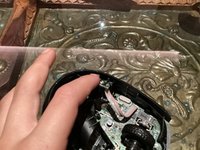
  3. How to fix Logitech M171 Mouse Laser, Removing the front cover: 手順 3、 2の画像 1 How to fix Logitech M171 Mouse Laser, Removing the front cover: 手順 3、 2の画像 2
    • Remove the front cover as show

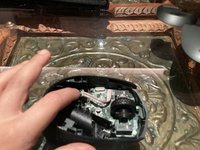
  4. How to fix Logitech M171 Mouse Laser, Removing the sensor: 手順 4、 1の画像 1
    • Pull on the sensor to remove it

  5. How to fix Logitech M171 Mouse Laser, Clean the sensor: 手順 5、 2の画像 1 How to fix Logitech M171 Mouse Laser, Clean the sensor: 手順 5、 2の画像 2
    • Clean the sensor with an tissue soaked in alcohol

  6. How to fix Logitech M171 Mouse Laser, Reassembly insert sensor: 手順 6、 2の画像 1 How to fix Logitech M171 Mouse Laser, Reassembly insert sensor: 手順 6、 2の画像 2
    • Insert sensor as shown

  7. How to fix Logitech M171 Mouse Laser: 手順 7、 2の画像 1 How to fix Logitech M171 Mouse Laser: 手順 7、 2の画像 2
    • Install the front plate put the front plate down on the mouse and push Down until it clips in

    • Install battery and USB key and back cover and you’re done

終わりに

You’re done Thanks for completing the guide

2 の人々がこのガイドを完成させました。

作成者

1人の作成者と共同作成されました。

Maimlian

メンバー登録日: 01/27/22

504 ポイント

2のガイドは作成済み

3件のガイドコメント

Frying the darker plastic cover open without damaging it is near impossible. I have a problem with my mouse wheel and I don't know how to lubricate it or fix the sensor. Can someone help with that?

Efe Şimşek - 返信

These are bad instructions, the top is released with 3 clips accessible under the battery cover, prising it off from above will break those clips. It can be hard to work out where the clips are and how to release them, but there are 3 one on each side and on under the battery. Aside from that the only other retention is a couple of hooks on the mouse buttons.

Gordon Wrigley - 返信

Agree that prizing the top off like this is going to damage it! Maybe my mouse, being blue on top, and black on bottom made this easier to spot, but it was very easy for me to see the three clips on the bottom. Hopefully anyone who wants to open theirs will see your comment and not use the opening tool like this.

Sid R -

コメントを追加

統計データ:

過去 24時間: 5

過去 7 日: 27

過去 30 日: 122

今までの合計 6,001