メインコンテンツにスキップ

How to clean lens

必要な工具と部品

  1. How to clean lens, Remove battery.: 手順 1、 1の画像 1
    • Insert wisdom here.

  2. How to clean lens, Remove cover on end of camera.: 手順 2、 1の画像 1
    • Remove black screw on bottom corner near bottom left of picture viewing screen. Gently pry off end of camera, exposing 2 black screws. Remove both screws.

    • If present, remove hand strap.

    • On hand strap anchor end, remove two black screws.

    • There are two black screws on the bottom of the camera right by the tripod mount. Remove the screw nearest to the back of the camera.

    • Open HDMI cover and remove single black screw.

  3. How to clean lens: 手順 6、 1の画像 1
    • Gently pry off back of camera.

  4. How to clean lens: 手順 7、 1の画像 1
    • Remove dial and centre button.

  5. How to clean lens: 手順 8、 1の画像 1
    • Remove small circuit board.

  6. How to clean lens: 手順 9、 1の画像 1
    • Remove black screw in upper corner, and black screw from top.

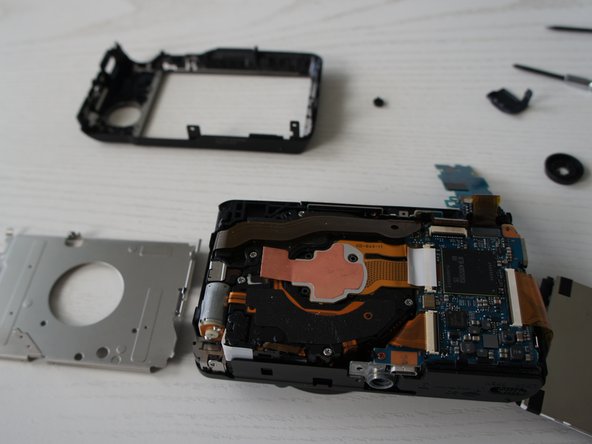
    • Remove metal cover.

  7. How to clean lens: 手順 10、 1の画像 1
    • Remove three silver screws.

    • Gently lift copper tab to expose lens and CCD.

    • Swab lens with 99% isopropyl rubbing alcohol (99% leaves very little residue when dry.)

終わりに

To reassemble your device, follow these instructions in reverse order.

4 の人々がこのガイドを完成させました。

作成者

4人の作成者と共同で作成されました。

Stan

メンバー登録日: 06/14/15

105 ポイント

1ガイドが承認済み

0件のガイドコメント

コメントを追加

統計データ:

過去 24時間: 1

過去 7 日: 1

過去 30 日: 1

今までの合計 784