メインコンテンツにスキップ

How To Replace Merangue 2-Line Engineering Scientific Calculator Battery

必要な工具と部品

  1. How To Replace Merangue 2-Line Engineering Scientific Calculator Battery, Calculator Battery: 手順 1、 1の画像 1
    • Turn the calculator off by holding down the [Shift] button.

    • Then, press the [AC][OFF] button.

    • Always turn your calculator off before removing the battery to prevent potential malfunction.

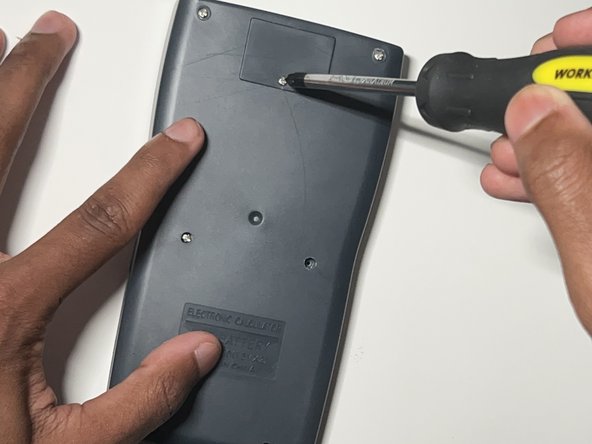
  2. How To Replace Merangue 2-Line Engineering Scientific Calculator Battery: 手順 2、 2の画像 1 How To Replace Merangue 2-Line Engineering Scientific Calculator Battery: 手順 2、 2の画像 2
    • Flip the calculator so that the back case is facing you.

    • Use a Phillips #0 screwdriver to remove the single screw from the battery cover at the top of the back case.

    • Keep the screw in a safe place to use when replacing the battery cover later.

    • If the screw does not unfasten easily, do not force it to avoid stripping the screw. If the screw is already stripped refer to the ネジ山が潰れたネジを取り出す方法 guide.

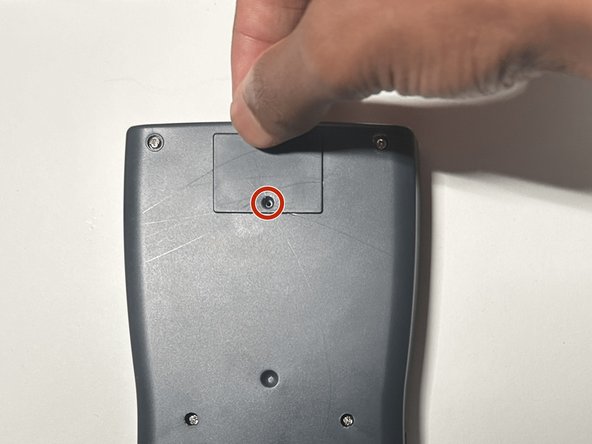
  3. How To Replace Merangue 2-Line Engineering Scientific Calculator Battery: 手順 3、 3の画像 1 How To Replace Merangue 2-Line Engineering Scientific Calculator Battery: 手順 3、 3の画像 2 How To Replace Merangue 2-Line Engineering Scientific Calculator Battery: 手順 3、 3の画像 3
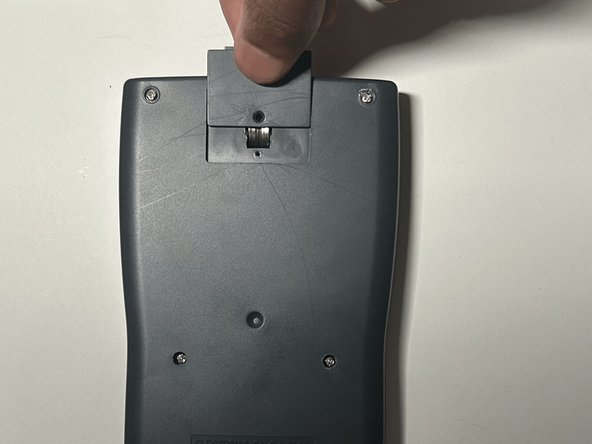
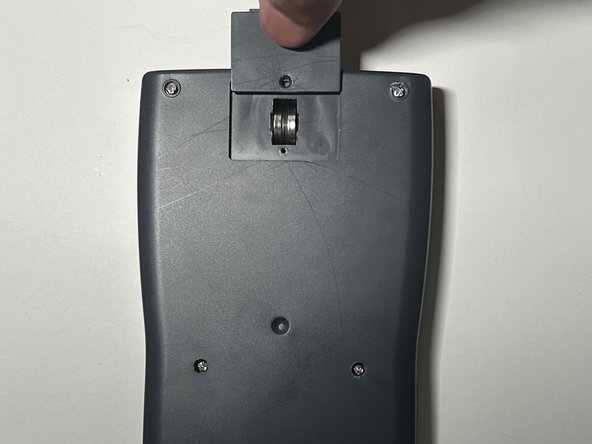
    • Gently apply pressure to the battery cover and slide it upward.

    • If it doesn't come off easily, try gently wiggling it but do not use excessive force.

  4. How To Replace Merangue 2-Line Engineering Scientific Calculator Battery: 手順 4、 3の画像 1 How To Replace Merangue 2-Line Engineering Scientific Calculator Battery: 手順 4、 3の画像 2 How To Replace Merangue 2-Line Engineering Scientific Calculator Battery: 手順 4、 3の画像 3
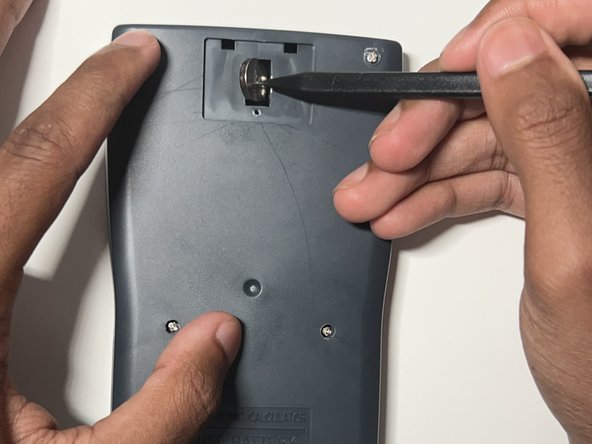
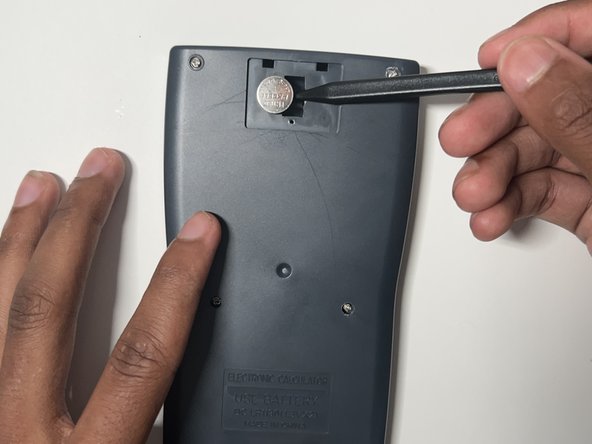
    • Insert a plastic spudger between the two batteries.

    • Use the plastic spudger to gently pry out the left and right batteries.

    • Do not use metal spudgers, as they can damage to the battery.

    • Do not use force when prying out the batteries to avoid damage.

  5. How To Replace Merangue 2-Line Engineering Scientific Calculator Battery: 手順 5、 1の画像 1
    • Put on the nitrile gloves and remove the two batteries from the battery compartment.

    • To dispose of the battery properly consult the How to Recycle End-of-Life Electronics article.

    • Always wear a pair of gloves prior to handling the battery to reduce the risk of chemical burns.

  6. How To Replace Merangue 2-Line Engineering Scientific Calculator Battery: 手順 6、 1の画像 1
    • Inspect the battery compartment for any sign of alkaline residue.

    • If the area is clean, skip to step 8.

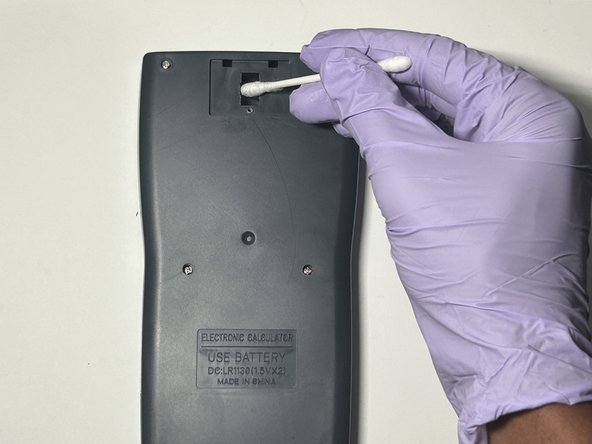
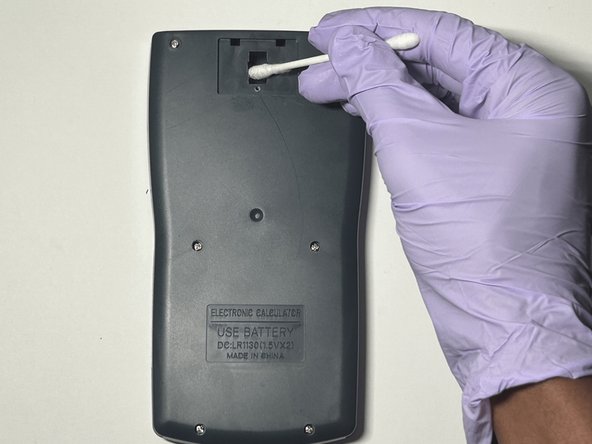
  7. How To Replace Merangue 2-Line Engineering Scientific Calculator Battery: 手順 7、 3の画像 1 How To Replace Merangue 2-Line Engineering Scientific Calculator Battery: 手順 7、 3の画像 2 How To Replace Merangue 2-Line Engineering Scientific Calculator Battery: 手順 7、 3の画像 3
    • Dab a cotton swab in distilled white vinegar.

    • Gently clean the battery compartment in an up and down motion with the cotton swab.

    • Allow the compartment to dry completely for approximately two minutes before inserting the new batteries.

  8. How To Replace Merangue 2-Line Engineering Scientific Calculator Battery: 手順 8、 1の画像 1
    • Insert the new LR 1130 batteries in both slots.

    • Make sure the + sign on the battery is facing down in its respective slot.

  9. How To Replace Merangue 2-Line Engineering Scientific Calculator Battery: 手順 9、 3の画像 1 How To Replace Merangue 2-Line Engineering Scientific Calculator Battery: 手順 9、 3の画像 2 How To Replace Merangue 2-Line Engineering Scientific Calculator Battery: 手順 9、 3の画像 3
    • Slide the battery cover back into place.

    • Use a Phillips #0 screwdriver to secure the battery cover screw.

  10. How To Replace Merangue 2-Line Engineering Scientific Calculator Battery: 手順 10、 1の画像 1
    • Reset the calculator by pressing the [ON] button.

    • Release the [ON] button and press [Shift].

    • Release the [Shift] button and press the [MODE] button.

    • Release the [MODE] button and press the [3] button to reset all.

    • Release the [3] button and press [=] to confirm the action.

    • Finally, release the [=] button and press the [AC] button to complete the reset.

終わりに

You have now successfully replaced the battery of a Merangue 2-Line Engineering Scientific Calculator.

3 の人々がこのガイドを完成させました。

作成者

1人の作成者と共同作成されました。

Lakshan.14

メンバー登録日: 07/02/24

235 ポイント

1ガイドが承認済み

チーム

York University, Team N-27, O'Regan Summer 2024 York University, Team N-27, O'Regan Summer 2024人のメンバー

YORK-O'REGAN-SU24SNG27

1 メンバー

1のガイドは作成済み

0件のガイドコメント

コメントを追加

統計データ:

過去 24時間: 1

過去 7 日: 4

過去 30 日: 30

今までの合計 432