メインコンテンツにスキップ
リペアコミュニティに参加 - アカウントの作成

Hisense Sero 7 Pro Battery Replacement

必要な工具と部品

    1. Hisense Sero 7 Pro Battery Replacement, Battery: 手順 1、 2の画像 1 Hisense Sero 7 Pro Battery Replacement, Battery: 手順 1、 2の画像 2
      • Turn tablet off before dissembling it.

      • Use caution when handling device if screen is cracked.

      • Using a plastic opening tool, pry open the back cover from the tablet.

      • An extra set of hands may be required.

      FixBotに聞いてみる

      コメントを追加

    2. Hisense Sero 7 Pro Battery Replacement: 手順 2、 2の画像 1 Hisense Sero 7 Pro Battery Replacement: 手順 2、 2の画像 2
      • Use a spudger to disconnect the battery from the motherboard.

      FixBotに聞いてみる

      コメントを追加

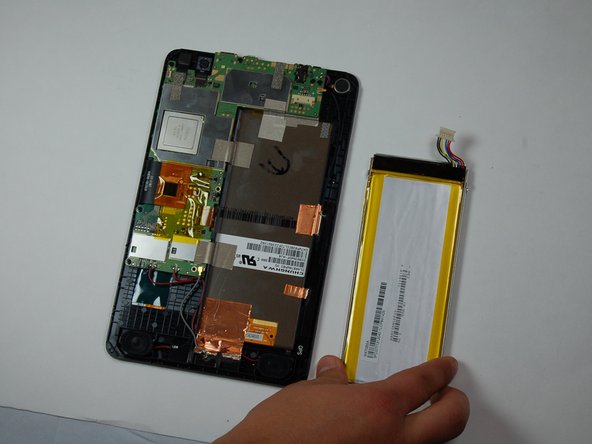
    3. Hisense Sero 7 Pro Battery Replacement: 手順 3、 2の画像 1 Hisense Sero 7 Pro Battery Replacement: 手順 3、 2の画像 2
      • Using a plastic opening tool, carefully place under one corner of the battery.

      • Move around edges of the battery to lift it off of the tablet.

      • Remove battery from tablet.

      FixBotに聞いてみる

      コメントを追加

終わりに

To reassemble your device, follow these instructions in reverse order.

キャンセル: このガイドを終了できませんでした。

作成者

2人の作成者と共同で作成されました。

Baochau Nguyen

メンバー登録日: 10/11/16

314 ポイント

3のガイドは作成済み

チーム

Texas Tech, Team 38-2, Bennett Fall 2016 Texas Tech, Team 38-2, Bennett Fall 2016人のメンバー

TTU-BENNETT-F16S38G2

4 メンバー

9のガイドは作成済み

2件のガイドコメント

would be nice to actually have replacement battery avaible to buy new battery

howlingwolff10 - 返信 共有

Where could one buy new battery?

Joshua Wood - 返信 共有

コメントを追加

統計データ:

過去 24時間: 0

過去 7 日: 8

過去 30 日: 26

今までの合計 3,089