メインコンテンツにスキップ

HP Stream 14-CB174WM Lower Case Replacement

必要な工具と部品

  1. HP Stream 14-CB174WM Lower Case Replacement, Lower Case: 手順 1、 2の画像 1 HP Stream 14-CB174WM Lower Case Replacement, Lower Case: 手順 1、 2の画像 2
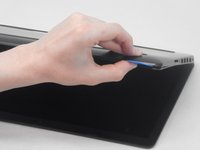
    • Use an opening pick to gently pry up the edge of the rubber foot.

    • Grab the lifted edge of the foot and gently pull it away.

    • Repeat for the other rubber foot.

    • The oils on your skin can damage the adhesive on the rubber feet. Try not to touch the adhesive part of the feet with your hands.

  2. HP Stream 14-CB174WM Lower Case Replacement: 手順 2、 2の画像 1 HP Stream 14-CB174WM Lower Case Replacement: 手順 2、 2の画像 2
    • Use a Phillips screwdriver to remove the eight 6.6 mm screws that secure the lower case.

  3. HP Stream 14-CB174WM Lower Case Replacement: 手順 3、 3の画像 1 HP Stream 14-CB174WM Lower Case Replacement: 手順 3、 3の画像 2 HP Stream 14-CB174WM Lower Case Replacement: 手順 3、 3の画像 3
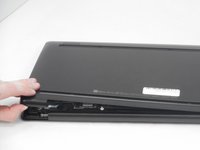
    • Insert an opening pick in the seam between the lower case and chassis.

    • Slide the opening pick around the perimeter, prying every couple of centimeters as you go.

    • You will hear "snaps" of the lower case retaining clips releasing.

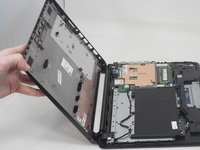
    • Continue prying around the entire perimeter until the lower case fully releases.

    • Lift off the lower case.

終わりに

To reassemble your device, follow these instructions in reverse order.

Connor Bassolino

メンバー登録日: 03/29/22

17,484 ポイント

74のガイドは作成済み

チーム

iFixit iFixit人のメンバー

Staff

123 メンバー

23,665のガイドは作成済み

0件のガイドコメント

コメントを追加

統計データ:

過去 24時間: 2

過去 7 日: 4

過去 30 日: 15

今までの合計 177