メインコンテンツにスキップ
リペアコミュニティに参加 - アカウントの作成

HP Spectre 13 4003dx x360 Touchpad Replacement

必要な工具と部品

    1. HP Spectre 13 4003dx x360 Touchpad Replacement, Battery: 手順 1、 2の画像 1 HP Spectre 13 4003dx x360 Touchpad Replacement, Battery: 手順 1、 2の画像 2
      この手順で使用する道具:
      Magnetic Project Mat
      $19.95
      • Before you begin, be sure to turn off your laptop and discharge the battery down to 25%.

      • Turn the computer upside down.

      • Use the T5 Torx Screwdriver to remove the eight 3.3 mm screws.

      • Make sure to use the magnetic project mat to help you keep track of the small screws.

      FixBotに聞いてみる

      コメントを追加

    2. HP Spectre 13 4003dx x360 Touchpad Replacement: 手順 2、 2の画像 1 HP Spectre 13 4003dx x360 Touchpad Replacement: 手順 2、 2の画像 2
      • Use an opening tool to pry up and loosen the back case from the laptop.

      • If the back case doesn't loosen easily, there may be screws hidden underneath the rubber feet. Carefully pry a foot up and remove any hidden screws.

      • Remove the back case.

      FixBotに聞いてみる

      コメントを追加

    3. HP Spectre 13 4003dx x360 Touchpad Replacement: 手順 3、 2の画像 1 HP Spectre 13 4003dx x360 Touchpad Replacement: 手順 3、 2の画像 2
      • Remove the four 2mm Phillips #00 screws securing the battery.

      • The screw locations are marked by small white arrows on the battery.

      FixBotに聞いてみる

      コメントを追加

    4. HP Spectre 13 4003dx x360 Touchpad Replacement: 手順 4、 3の画像 1 HP Spectre 13 4003dx x360 Touchpad Replacement: 手順 4、 3の画像 2 HP Spectre 13 4003dx x360 Touchpad Replacement: 手順 4、 3の画像 3
      • Peel off the adhesive on the left side of the battery holding the speaker wire down.

      • Move the battery slightly to gain access to the battery plug, located on the left edge of the battery.

      • Carefully unplug the battery by pulling the connector towards the battery.

      • Pull parallel to the battery, not straight up.

      • Remove the battery.

      • It is normal for your battery to flex and bend a bit where the wider section meets the narrower section.

      FixBotに聞いてみる

      コメントを追加

    1. HP Spectre 13 4003dx x360 Touchpad Replacement, Touchpad: 手順 5、 2の画像 1 HP Spectre 13 4003dx x360 Touchpad Replacement, Touchpad: 手順 5、 2の画像 2
      • Using a plastic opening tool, lift the locking bar on the trackpad ZIF connector.

      • Gently pull the cable out.

      FixBotに聞いてみる

      コメントを追加

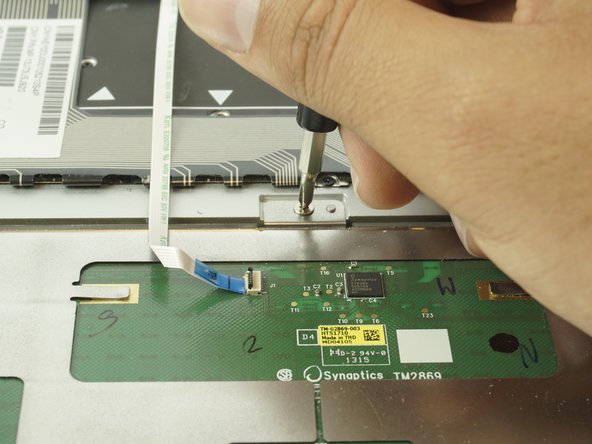
    2. HP Spectre 13 4003dx x360 Touchpad Replacement: 手順 6、 3の画像 1 HP Spectre 13 4003dx x360 Touchpad Replacement: 手順 6、 3の画像 2 HP Spectre 13 4003dx x360 Touchpad Replacement: 手順 6、 3の画像 3
      • Using the PH00 Screwdriver, remove the five 2.0 mm screws indicated in the picture.

      FixBotに聞いてみる

      コメントを追加

    3. HP Spectre 13 4003dx x360 Touchpad Replacement: 手順 7、 2の画像 1 HP Spectre 13 4003dx x360 Touchpad Replacement: 手順 7、 2の画像 2
      • Using a plastic opening tool, carefully lift up on the lower center metal piece of the touchpad.

      • Using both hands, gently lift up on the touchpad until it is completely removed.

      • If you are uncomfortable using the plastic opening tool, both hands can be used to remove the touchpad.

      FixBotに聞いてみる

      コメントを追加

終わりに

To reassemble your device, follow these instructions in reverse order.

キャンセル: このガイドを終了できませんでした。

2 の人々がこのガイドを完成させました。

作成者

2人の作成者と共同で作成されました。

Ethan Plumer

メンバー登録日: 01/29/18

611 ポイント

2のガイドは作成済み

チーム

USF Tampa, Team S5-G4, Passmore Spring 2018 USF Tampa, Team S5-G4, Passmore Spring 2018人のメンバー

USFT-PASSMORE-S18S5G4

3 メンバー

48のガイドは作成済み

0件のガイドコメント

コメントを追加

統計データ:

過去 24時間: 3

過去 7 日: 9

過去 30 日: 41

今までの合計 4,722