メインコンテンツにスキップ
リペアコミュニティに参加 - アカウントの作成

HP Pavilion 15-ab165us RAM Replacement

必要な工具と部品

  1. HP Pavilion 15-ab165us RAM Replacement, Battery and Back Cover: 手順 1、 2の画像 1 HP Pavilion 15-ab165us RAM Replacement, Battery and Back Cover: 手順 1、 2の画像 2
    • Flip the computer over so that the bottom cover is facing you.

    • Slide the two locks to the "unlock" position and remove the battery.

    FixBotに聞いてみる
  2. HP Pavilion 15-ab165us RAM Replacement: 手順 2、 3の画像 1 HP Pavilion 15-ab165us RAM Replacement: 手順 2、 3の画像 2 HP Pavilion 15-ab165us RAM Replacement: 手順 2、 3の画像 3
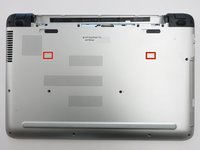
    • Remove the two 8mm screws underneath with a Phillips #1 screwdriver.

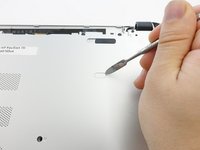
    • Use a plastic opening tool to remove the plastic feet.

    FixBotに聞いてみる
  3. HP Pavilion 15-ab165us RAM Replacement: 手順 3、 3の画像 1 HP Pavilion 15-ab165us RAM Replacement: 手順 3、 3の画像 2 HP Pavilion 15-ab165us RAM Replacement: 手順 3、 3の画像 3
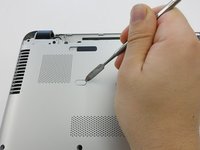
    • Remove the two plastic tabs with a metal spudger.

    FixBotに聞いてみる
  4. HP Pavilion 15-ab165us RAM Replacement: 手順 4、 1の画像 1
    • Remove the sixteen 8mm screws that hold the bottom cover with a Phillips #1 screwdriver.

    FixBotに聞いてみる
  5. HP Pavilion 15-ab165us RAM Replacement: 手順 5、 1の画像 1
    • Pull the Optical Drive out.

    FixBotに聞いてみる
  6. HP Pavilion 15-ab165us RAM Replacement: 手順 6、 1の画像 1
    • Remove the 3mm screws that were hidden under the Optical Drive with a Phillips #0 screwdriver.

    FixBotに聞いてみる
  7. HP Pavilion 15-ab165us RAM Replacement: 手順 7、 2の画像 1 HP Pavilion 15-ab165us RAM Replacement: 手順 7、 2の画像 2
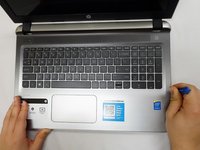
    • Flip the computer back over.

    • Use a plastic opening tool to release the clips holding the keyboard section in place.

    FixBotに聞いてみる
  8. HP Pavilion 15-ab165us RAM Replacement: 手順 8、 1の画像 1
    • Close the lid and pull the screen and keyboard section up and away from the disconnected bottom cover.

    • The hard drive is NOT screwed into place on the underside of the keyboard section.

    FixBotに聞いてみる
  9. HP Pavilion 15-ab165us RAM Replacement, RAM: 手順 9、 1の画像 1
    • Locate RAM.

    FixBotに聞いてみる
  10. HP Pavilion 15-ab165us RAM Replacement: 手順 10、 1の画像 1
    • Pull the tension arms away from both sides the RAM.

    FixBotに聞いてみる
  11. HP Pavilion 15-ab165us RAM Replacement: 手順 11、 1の画像 1
    • Pull RAM away from the RAM slot.

    FixBotに聞いてみる
  12. HP Pavilion 15-ab165us RAM Replacement: 手順 12、 1の画像 1
    • Repeat this process for the next stick of RAM.

    FixBotに聞いてみる
終わりに

To reassemble your device, follow these instructions in reverse order.

3 の人々がこのガイドを完成させました。

作成者

3人の作成者と共同で作成されました。

Myai Nguyen

メンバー登録日: 10/20/17

203 ポイント

1ガイドが承認済み

チーム

UW Tacoma, Team S1-G2, Rose Fall 2017 UW Tacoma, Team S1-G2, Rose Fall 2017人のメンバー

UWT-ROSE-F17S1G2

5 メンバー

14のガイドは作成済み

0件のガイドコメント

コメントを追加

統計データ:

過去 24時間: 1

過去 7 日: 9

過去 30 日: 44

今までの合計 2,608