メインコンテンツにスキップ

HP Envy x2 13-j002dx Battery Replacement

必要な工具と部品

  1. HP Envy x2 13-j002dx Battery Replacement, Battery: 手順 1、 1の画像 1
    • Remove five 4mm Phillips #0 screws securing the lower case to the HP Envy x2 13-j002dx.

  2. HP Envy x2 13-j002dx Battery Replacement: 手順 2、 1の画像 1
    • Use a Phillips #00 screwdriver to remove the two 3.5 mm screws from the bottom of the device—one on each side of the keyboard dock.

  3. HP Envy x2 13-j002dx Battery Replacement: 手順 3、 1の画像 1
    この手順で使用する道具:
    Tweezers
    $4.99
    • Use a pair of tweezers to remove the screw covers on the bottom of the device.

    • Use a Phillips #0 screwdriver to remove the two 4mm screws.

  4. HP Envy x2 13-j002dx Battery Replacement: 手順 4、 2の画像 1 HP Envy x2 13-j002dx Battery Replacement: 手順 4、 2の画像 2
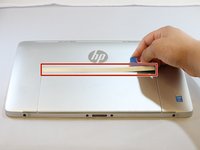
    • Use an opening pick to remove the plastic cover above the back stand.

    • Pry the cover off.

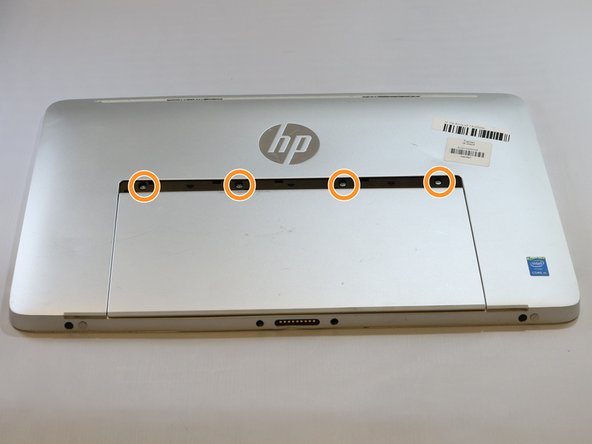
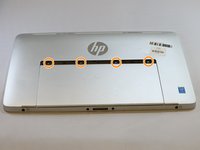
    • Use a Phillips #0 screwdriver to remove the four 4 mm screws.

  5. HP Envy x2 13-j002dx Battery Replacement: 手順 5、 1の画像 1
    • Use an opening pick and a prying tool, and go around the device to remove the back cover from the rest of the assembly.

  6. HP Envy x2 13-j002dx Battery Replacement: 手順 6、 1の画像 1
    • Unplug the battery from the motherboard.

  7. HP Envy x2 13-j002dx Battery Replacement: 手順 7、 2の画像 1 HP Envy x2 13-j002dx Battery Replacement: 手順 7、 2の画像 2
    • Carefully pull up on the battery connector from the speaker.

    • Use a pair of tweezers and remove the taped down wire for the speaker.

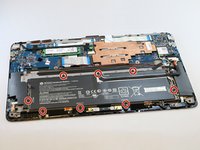
    • Use a Phillips #00 screwdriver to remove the seven 3mm screws around the battery.

  8. HP Envy x2 13-j002dx Battery Replacement: 手順 8、 1の画像 1
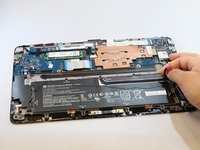
    • Carefully lift up and remove the battery.

終わりに

To reassemble your device, follow these instructions in reverse order.

5 の人々がこのガイドを完成させました。

作成者

7人の作成者と共同で作成されました。

Aaron Page

メンバー登録日: 01/17/19

418 ポイント

1ガイドが承認済み

チーム

1件のガイドコメント

For step 2, when I was taking the screws out, they were held in by the magnets that were on either side of them making it difficult to remove. I ended up having to use another magnet to get them out.

Reed Jochimsen - 返信

コメントを追加

統計データ:

過去 24時間: 2

過去 7 日: 5

過去 30 日: 21

今までの合計 2,154